Introduction
This module is an introduction to Time of Flight (ToF) as well as a discussion of the physical aspects of the solution. ToF is a localization method used to perform secure range bounding.
Time of Flight is based on the common RTLS Architecture that is discussed in the Realtime Localization System Introduction lab.
It is assumed that the reader has a basic knowledge of embedded tool chains and general C and Python programming concepts.
This lab is based on the rtls_master rtls_slave and rtls_passive
projects that are part of the SimpleLink™ CC2640R2 SDK
(http://www.ti.com/tool/SIMPLELINK-CC2640R2-SDK).
This lab is a follow up to the RTLS Introduction lab, and will cover:
- ToF Modes of Operation
- ToF Security
- ToF Accuracy and Confidence intervals
Prerequisites
Other SimpleLink Academy Labs
- Completion of Realtime Localization System Introduction
Required Training
It is required that users complete all steps of the RTLS Introduction lab before moving on to the Time of Flight lab. It is also assumed that the user has already installed the software, setup the hardware, and read the recommended chapters covered by the introduction lab. For brevity, only new content will be listed here.
Hardware
This module requires the following kits:
BOOSTXL-AOA and ToF
The ToF examples in the SDK do not initialize the RF switch pins on the BOOSTXL-AOA; therefore, the BOOSTXL-AOA should be removed before running the ToF examples. Be sure that use a LaunchPad setup for using the PCB antenna (no capacitor change).
Getting started – Desktop
Install the Software
This lab requires that you have completed all the steps in the RTLS Introduction lab. This means that you must have
- CC2640R2 SDK installed
- Working Python environment
- Modified
rtls_example.pyscript that sets up an RTLS network.
Modify/Load the software
- Load Board #1 with
rtls_passiveproject:
<SimpleLink CC2640R2 SDK> → examples → rtos → CC2640R2_LAUNCHXL → blestack → rtls_passive - Load Board #2 with
rtls_slaveproject:
<SimpleLink CC2640R2 SDK> → examples → rtos → CC2640R2_LAUNCHXL → blestack → rtls_slave - Load Board #3 with
rtls_masterproject:
<SimpleLink CC2640R2 SDK> → examples → rtos → CC2640R2_LAUNCHXL → blestack → rtls_master
ToF Modes of Operation
The behavior of ToF is controlled via the parameters set in the
RTLS_CMD_TOF_SET_PARAMS UNPI request. This request is sent to the master and
passive. The master will relay the selected ToF settings to the slave over BLE.
RTLS_CMD_TOF_SET_PARAMS must be called before running ToF.
ToF Result Mode
The RTLS nodes can be configured to report ToF sample data in the following ways:
| ToF Result Mode | Summary | Number of serial frames/burst | Payload Information |
|---|---|---|---|
RTLS_CMD_TOF_RESULT_DIST |
Provides a single distance estimation across all frequencies in the burst and moving averaged across all bursts | 1 |
|
RTLS_CMD_TOF_RESULT_STAT |
Provides tick average and variance per frequency | 1 for each frequency used |
|
RTLS_CMD_TOF_RESULT_RAW |
Provides each tick sample within the burst directly from the RF core. | numBurstSamples/2 |
|
ToF mode can be controlled via the resultMode field of
RTLS_CMD_TOF_SET_PARAMS. Result modes lower in the table provide more data to
the PC, but also require the embedded device to send UNPI frames more frequently
and use more RAM.
Selecting a ToF Result Mode
It is recommended to use the most verbose mode to prototype ToF algorithms on PC and then reduce the frequency at which data is sent by balancing the processing between the node manager and embedded devices.
ToF Run Mode
runMode is a parameter within the RTLS_CMD_TOF_SET_PARAMS that describes
what will trigger ToF measurements to be taken and how frequently ToF
measurements will run.
| ToF Mode | Summary |
|---|---|
TOF_MODE_CONT |
ToF will run continuously until RTLS_CMD_TOF_ENABLE is called with the stop parameter |
TOF_MODE_AUTO |
ToF is automatically triggered based on RSSI of the slave device The RSSI is measured during the connection event and the threshold is set by the autoTofRssiThresh parameter of RTLS_CMD_TOF_SET_PARAMS |
TOF_MODE_ONE_SHOT |
ToF will run once per RTLS_CMD_TOF_ENABLE |
It is important to consider power budget when selecting a runMode. Continuously running ToF is good for prototyping algorithms on the PC side as a lot of data is provided, but is not the most efficient for battery powered operations.
It is recommended to trigger ToF based on RSSI and only run to collect the minimum number samples required to achieve a given confidence interval. The number of samples vs confidence interval tradeoff is discussed in ToF Accuracy and Confidence intervals.
ToF runs will always be interleaved with BLE as described in the TI BLE-Stack User's Guide, RTLS Toolbox > Time of Flight chapter.
Syncwords Per Burst
Another parameter of interest in the RTLS_CMD_TOF_SET_PARAMS command
is the number of samples. numSamples dictates how many
syncwords are used by each ToF burst. From reading the
TI BLE-Stack User's Guide,
you might remember that it takes two syncwords to create a single ToF sample
(PING + PONG). This yields the following equation:
NumTickMeasurements = numSamples/2
Put another way, the number of tick measurements performed per time of flight
burst is half of the numSamples parameter.
ToF Result Mode and Ticks
Remember that not all ToF modes report out the raw tick values of each sample.
This means you might not observe more data being sent to the PC when increasing
numSamples. This is because in modes like RTLS_CMD_TOF_RESULT_DIST and
RTLS_CMD_TOF_RESULT_STAT there is some preprocessing of the samples performed
on the device.
As mentioned above, the ToF runs will be interleaved with BLE connection events. It is important the ToF exchanges can fit in between the BLE connection interval selected. The amount of time it takes to perform a ToF measurement is covered in ToF Accuracy and Confidence intervals.
Frequencies
RTLS_CMD_TOF_SET_PARAMS also takes a frequency list and number of frequencies.
Each entry in the frequency list corresponds to a channel that Time of Flight
should be performed on. It is important to have diversity in the frequencies
selected for ToF as Physical factors such as multi-path fading are frequency
selective.
frequenciesis a list of frequencies in MHz of the BLE channels to use for ToFnumFreqis the number of channels in this list
BLE channels are spaced 2MHz apart and range from [2402, 2480] (inclusive). While ToF does not use the BLE physical packet format directly, it does use the same channel map. Frequencies in this range are acceptable ToF params. A channel is specified by the frequency of its carrier wave.
The frequency list can be initialized in Python using the code below:
    tofFreqList = [2408, 2412, 2418, 2424] #Other options: 2414, 2420
    tofNumFreq = len(tofFreqList)
Which is the most power efficient ToF run mode?
Assuming RTLS_CMD_TOF_RESULT_RAW, how much data in bytes is sent per burst?
ToF Security
The integrity of Time of Flight relies on an eavesdropper being unable to guess
the next syncword to be used in the ToF burst. In order to realize this,
ToF employs the AESCTRDRBG algorithm to generate syncwords securely such that
nodes within the ToF network will be able to derive the next syncword, but
eavesdroppers may not.
AESCTRDRBG relies on a random seed being distributed to all nodes in the
network. This seed is sent from rtls_master to rtls_slave over an
authenticated encrypted BLE L2CAP connection oriented channel. The seed
also needs to be distributed from the rtls_master to the rtls_passive
devices via the PC/ Node Manager.
This section will not go into the theory of AESCTRDRBG or seed generation,
but instead will focus on the steps necessary to distribute the seed in a ToF
network using Python.
The command RTLS_CMD_TOF_GET_SEC_SEED will extract the seed from the master
and the command RTLS_CMD_TOF_SET_SEC_SEED will inform the passive to use
this seed.
The ToF seed should be obtained from the master after setting up the ToF
parameters. Assuming that you have an RTLSNode called masterNode
you can query the seed from the master like this:
masterNode.rtls.tof_get_sec_seed()
And process the incoming message like this:
if msg.command == 'RTLS_CMD_TOF_GET_SEC_SEED' and msg.payload.seed is not 0:
    seed = msg.payload.seed
Once you have the seed, it should be sent to all passive nodes. Assuming there
is a list of passive nodes called passiveNodes the seed can be shared as
below:
for node in passiveNodes:
    node.rtls.tof_set_sec_seed(seed)
With the seed shared and parameters set, it is now possible to enable ToF. This will be covered in Task 1.
ToF Accuracy and Confidence Intervals
Each ToF tick has a resolution defined by TICK_TO_METER (defined in TOF.h).
The resolution is 18.75 meters per tick. However, thanks to random offsets
between the symbol clocks in the transmitter and receiver between master, slave,
and passive, tick results will be jittered. When averaging over many ToF
samples this jitter makes it possible to measure distance
(within a given confidence interval)
that is below the resolution of a single tick. The TI BLE-Stack User's Guide
(RTLS Toolbox > Time of Flight > Accuracy) has a concrete example of this.
The basic principle is that a higher confidence interval can be achieved by adding more samples. More samples can be added by way of increasing the burst size of a ToF run or adding ToF passive nodes. More samples come at the cost of power and time.
Confidence interval
We are using a two sided confidence interval.
For example a confidence interval of 4 meters at 95% confidence level means that the ToF measurements will be within +/- 2m of the true distance at 95% confidence level.
Configure ToF using the following guidelines.
- Set the number of nodes collecting samples in the system.
- Set the confidence interval (m) and confidence level (%)
- Use the tool below to calculate the required number of packet exchanges and time
Recommendations:
- Limit the ToF time to fit in between BLE connection events
- Use largest possible burst size for available system RAM
- The number of samples may need to be split across multiple bursts
ToF samples consume at least sizeof(rfc_CMD_TOF_sample_t) (from rfc_cmd_tof.h).
Additionally there is overhead required to send ToF results through UNPI and
calculating results depending on resultMode set in RTLS_CMD_TOF_SET_PARAMS.
How Does the ToF Calculator Work?
Time of Flight ticks will be normally distributed around the true distance.
Given a variance of TICK_TO_METER*0.64, the calculator will use a lookup
table of Z values for given confidence level and confidence interval. This will
be plugged into the equation below (taken from NIST weblink above).
                         (z1−α/2)σ
Confidence interval = ± ----------
                          sqrt(N)
Legend:
(z1−α/2): Z value for given confidence level, from lookup tableσ: The variance of ToF samples. We use0.64, see note below.sqrt(N): Square root of sample size
The calculator will solve the equation above for N. Then it solves for number of samples based on the number of nodes using the equation below.
N = numNodes*numSamplesPerNode
Remember from syncwords per burst that each burst
only produces numSamples/2 samples.
It then multiplies the ToF time slot(520us) by the number of packets to
determine how long it takes to gather this many samples.
This explains why you may notice large variations in the distance calculated in the out of box ToF demo. At 64 samples per burst, the confidence interval is very wide at reasonably high confidence levels. To remedy this, it is recommended to take more samples.
ToF Calculator
The ToF calculator is not production verified and is provided for estimation only. The variance has been observed to be between 1 and 0.64. This is dependent on device and frequency.
Task 1 – Setup ToF using Python
In section ToF Modes of Operation and ToF Security we covered the required setup procedure for running ToF. In this task we will pick up where the Realtime Localization System Introduction lab left off, initialize ToF and start a ToF run.
In order to setup ToF, the following steps must be performed:
- Setup RTLS network as done in the RTLS Intro Lab
- At this point a connection is formed, encrypted with authentication, and an L2CAP CoC is open between master and slave
- Set ToF Parameters
- Get ToF Security Seed from master and distribute it to passives
- Enable ToF run
A sequence diagram for setting up and running ToF is shown below. This continues where the RTLS Setup Sequence Diagram from the RTLS Introduction lab left off.
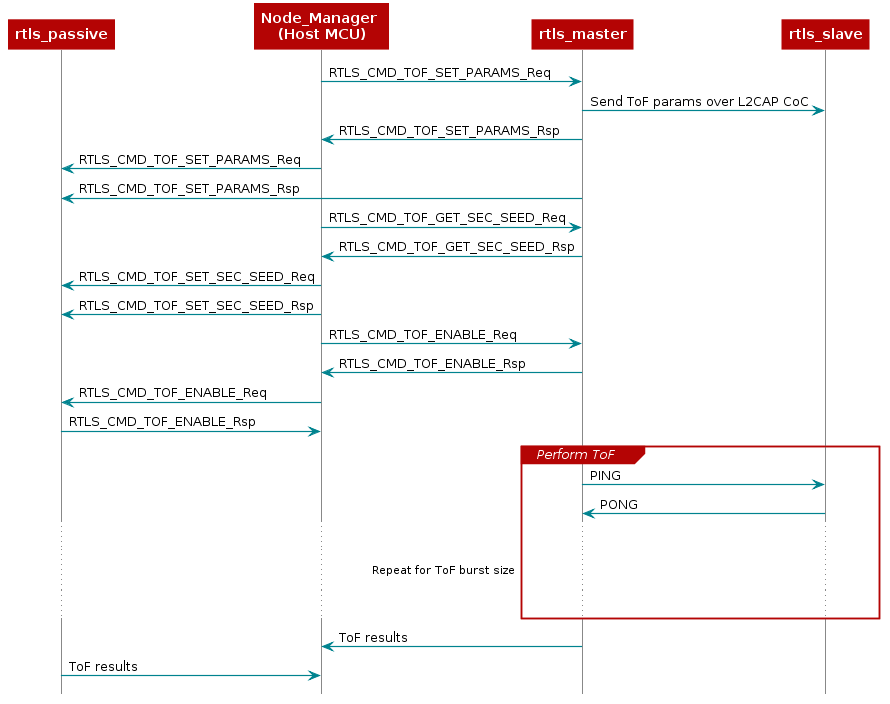
Now we will pick up where we left off at the end of the RTLS Introduction Lab.
The last message we had processed was the RTLS_CMD_CONNECT like this:
if msg.command == 'RTLS_CMD_CONNECT' and msg.type == 'AsyncReq' and msg.payload.status == 'RTLS_SUCCESS':
    print ("Connection established, all systems go!!!")
From above, we know that instead of just printing on connect, we should focus on
setting up ToF parameters. The snippet below will build up ToF parameters and
send to masterNode and each passiveNodes. Also assume we have the following
global variables. These are related to ToF parameters and seed as discussed
earlier in the lab.
samplesPerBurst = 64
tofFreqList = [2408, 2412, 2418, 2424] #Other options: 2414, 2420
tofNumFreq = len(tofFreqList)
autoToFRssi = -55
tofSampleMode = 'TOF_MODE_DIST'
tofRunMode = 'TOF_MODE_CONT'
numInitToFNodes = 0
seed = 0
Now we will use some of these variables to setup the ToF parameters after we are notified that the RTLS network is connected.
if msg.command == 'RTLS_CMD_CONNECT' and msg.type == 'AsyncReq':

    if msg.payload.status == 'RTLS_SUCCESS':
        # Iterate over all passive nodes, send ToF params
        for node in passiveNodes:
            node.rtls.tof_set_params('TOF_PASSIVE', samplesPerBurst,
                                    tofNumFreq, autoToFRssi,
                                    tofSampleMode, tofRunMode,
                                    tofFreqList)

        # Send ToF params to master
        masterNode.rtls.tof_set_params('TOF_MASTER', samplesPerBurst,
                                        tofNumFreq, autoToFRssi,
                                        tofSampleMode, tofRunMode,
                                        tofFreqList)
    else:
        # The connection failed, keep scanning.
        masterNode.rtls.scan()
After sending the ToF parameters, we will pend on a response from all nodes. Once all nodes have acknowledged that their ToF parameters are set, the security seed needs to be read from the master node and shared with the passive nodes.
if msg.command == 'RTLS_CMD_TOF_SET_PARAMS' and msg.payload.status == 'RTLS_SUCCESS':
    numInitToFNodes += 1

    # If all nodes have responded then we are ready to move on
    if numInitToFNodes == len(passiveNodes + [masterNode]):
        # We will reuse this var when distributing seed
        numInitToFNodes = 0
        # Send request for seed to master
        masterNode.rtls.tof_get_sec_seed()

    # Wait for security seed
    if msg.command == 'RTLS_CMD_TOF_GET_SEC_SEED' and msg.payload.seed is not 0:
        seed = msg.payload.seed
        for node in passiveNodes:
            node.rtls.tof_set_sec_seed(seed)
With the security seed distributed, Time of flight can be started as below:
# Wait until passives have security seed set and
if msg.command == 'RTLS_CMD_TOF_SET_SEC_SEED' and msg.payload.status == 'RTLS_SUCCESS':
    numInitToFNodes += 1
    if numInitToFNodes == len(passiveNodes):
        for node in passiveNodes:
            node.rtls.tof_start(True)

        masterNode.rtls.tof_start(True)
At this stage we have used the Python environment to start ToF data collection in distance mode. It will run continuously until the program is killed (ctrl + c). At this point we have achieved the same setup as the GUI will make in Task 2 of the RTLS Introduction lab.
Reminder: Be sure to adjust the COM port to match master and passive LaunchPads.
Update slaveAddr to match rtls_slave or set to None
# From line #17 of solution below, adjust for COM ports
my_nodes = [RTLSNode('COM17', 115200), RTLSNode('COM47', 115200)]
# If slave addr is None, the script will connect to the first RTLS slave
# that it found. If you wish to connect to a specific device
# (in the case of multiple RTLS slaves) then you may specify the address
# explicitly as given in the comment to the right
slaveAddr = None #'54:6C:0E:83:3F:3D'
See below for solution:
import queue
import time
import logging
import sys

from rtls.rtlsmanager import RTLSManager
from rtls.rtlsnode import RTLSNode, Subscriber


# Uncomment the below to get raw serial transaction logs

# logging.basicConfig(stream=sys.stdout, level=logging.DEBUG,
#                     format='[%(asctime)s] {%(filename)s:%(lineno)d} %(levelname)s - %(message)s')

if __name__ == '__main__':
    # Initialize, but don't start RTLS Nodes to give to the RTLSManager
    my_nodes = [RTLSNode('COM300', 115200), RTLSNode('COM322', 115200)]

    # Initialize references to the connected devices
    masterNode = None
    address = None
    addressType = None
    passiveNodes = []
    samplesPerBurst = 68
    tofFreqList = [2408, 2412, 2418, 2424] #Other options: 2414, 2420
    tofNumFreq = len(tofFreqList)
    autoToFRssi = -55
    tofSampleMode = 'TOF_MODE_DIST'
    tofRunMode = 'TOF_MODE_CONT'
    numInitToFNodes = 0
    seed = 0

    # If slave addr is None, the script will connect to the first RTLS slave
    # that it found. If you wish to connect to a specific device
    # (in the case of multiple RTLS slaves) then you may specify the address
    # explicitly as given in the comment to the right
    slaveAddr = None #'54:6C:0E:83:3F:3D'

    # Initialize manager reference, because on Exception we need to stop the manager to stop all the threads.
    manager = None
    try:
        # Start an RTLSManager instance without WebSocket server enabled
        manager = RTLSManager(my_nodes, wssport=None)
        # Create a subscriber object for RTLSManager messages
        managerSub = Subscriber(queue=queue.PriorityQueue(), interest=None, transient=False, eventloop=None)
        # Attach subscriber to manager
        manager.add_subscriber(managerSub)

        # Tell the manager to automatically distribute connection parameters
        manager.auto_params = True

        # Start RTLS Node threads, Serial threads, and manager thread
        manager.start()

        # Wait until nodes have responded to automatic identify command, and assign nodes to application references
        timeout = time.time() + 5
        while time.time() < timeout:
            if all([node.identifier is not None for node in manager.nodes]):
                try:
                    masterNode = next((n for n in manager.nodes if n.capabilities.get('RTLS_MASTER', False)))
                except StopIteration:
                    pass
                passiveNodes = [n for n in manager.nodes if not n.capabilities.get('RTLS_MASTER', False)]
                break
            time.sleep(0.1)

        # Exit if no master node exists
        if not masterNode:
            raise RuntimeError("No RTLS Master node connected")

        #
        # At this point the connected devices are initialized and ready
        #

        # Display list of connected devices
        print(f"{masterNode.identifier} {', '.join([str(c) for c, e in masterNode.capabilities.items() if e])}")
        for pn in passiveNodes:
            print(f"{pn.identifier} {', '.join([str(c) for c, e in pn.capabilities.items() if e])}")

        print("\nSending example command RTLS_CMD_IDENTIFY; responses below\n")

        # Send an example command to each of them, from commands listed at the bottom of rtls/ss_rtls.py
        for n in passiveNodes + [masterNode]:
            n.rtls.identify()

        while True:
            # Get messages from manager
            try:
                node_msg = managerSub.pend(block=True, timeout=0.05)
                from_node = node_msg.identifier
                msg = node_msg.message.item
                print(node_msg.as_json())

                # After identify is received, we start scanning
                if msg.command == 'RTLS_CMD_IDENTIFY':
                      masterNode.rtls.scan()

                # Once we start scaning, we will save the address of the
                # last scan response
                if msg.command == 'RTLS_CMD_SCAN' and msg.type == 'AsyncReq':
                    address = msg.payload.addr
                    addressType = msg.payload.addrType

                # Once the scan has stopped and we have a valid address, then
                # connect
                if msg.command == 'RTLS_CMD_SCAN_STOP':
                    if address is not None and addressType is not None and (slaveAddr is None or slaveAddr == address):
                        masterNode.rtls.connect(addressType, address)
                    else:
                        # If we didn't find the device, keep scanning.
                        masterNode.rtls.scan()

                # Once we are connected, then we can do stuff
                if msg.command == 'RTLS_CMD_CONNECT' and msg.type == 'AsyncReq':

                    if msg.payload.status == 'RTLS_SUCCESS':
                        # Iterate over all passive nodes, send ToF params
                        for node in passiveNodes:
                            node.rtls.tof_set_params('TOF_PASSIVE', samplesPerBurst,
                                                    tofNumFreq, autoToFRssi,
                                                    tofSampleMode, tofRunMode,
                                                    tofFreqList)

                        # Send ToF params to master
                        masterNode.rtls.tof_set_params('TOF_MASTER', samplesPerBurst,
                                                        tofNumFreq, autoToFRssi,
                                                        tofSampleMode, tofRunMode,
                                                        tofFreqList)
                    else:
                        # The connection failed, keep scanning.
                        masterNode.rtls.scan()

                # Count the number of nodes that have ToF initialized
                if msg.command == 'RTLS_CMD_TOF_SET_PARAMS' and msg.payload.status == 'RTLS_SUCCESS':
                    numInitToFNodes += 1

                    # If all nodes have responded then we are ready to move on
                    if numInitToFNodes == len(passiveNodes + [masterNode]):
                        # We will reuse this var when distributing seed
                        numInitToFNodes = 0
                        # Send request for seed to master
                        masterNode.rtls.tof_get_sec_seed()

                # Wait for security seed
                if msg.command == 'RTLS_CMD_TOF_GET_SEC_SEED' and msg.payload.seed is not 0:
                    seed = msg.payload.seed
                    for node in passiveNodes:
                        node.rtls.tof_set_sec_seed(seed)

                # Wait until passives have security seed set and start ToF
                if msg.command == 'RTLS_CMD_TOF_SET_SEC_SEED'and msg.payload.status == 'RTLS_SUCCESS':
                    numInitToFNodes += 1
                    if numInitToFNodes == len(passiveNodes):
                        for node in passiveNodes:
                            node.rtls.tof_start(True)

                        masterNode.rtls.tof_start(True)


            except queue.Empty:
                pass

    finally:
        if manager:
            manager.stop()
Sample Output
Here is a small snippet of the expected output from the solution above. Note that the ToF results will run continuously until the program is stopped (ctrl + c).
54:6C:0E:9F:12:27 TOF_MASTER, RTLS_MASTER
54:6C:0E:83:3A:A4 CM, TOF_PASSIVE, RTLS_PASSIVE

Sending example command RTLS_CMD_IDENTIFY; responses below

{"identifier": "54:6C:0E:9F:12:27", "message": {"originator": "Nwp", "type": "SyncRsp", "subsystem": "RTLS", "command": "RTLS_CMD_IDENTIFY", "payload": {"capabilities": {"CM": false, "AOA_TX": false, "AOA_RX": false, "TOF_SLAVE": false,
"TOF_PASSIVE": false, "TOF_MASTER": true, "RTLS_SLAVE": false, "RTLS_MASTER": true, "RTLS_PASSIVE": false}, "identifier": "54:6C:0E:9F:12:27"}}}
{"identifier": "54:6C:0E:83:3A:A4", "message": {"originator": "Nwp", "type": "SyncRsp", "subsystem": "RTLS", "command": "RTLS_CMD_IDENTIFY", "payload": {"capabilities": {"CM": true, "AOA_TX": false, "AOA_RX": false, "TOF_SLAVE": false, "TOF_PASSIVE": true, "TOF_MASTER": false, "RTLS_SLAVE": false, "RTLS_MASTER": false, "RTLS_PASSIVE": true}, "identifier": "54:6C:0E:83:3A:A4"}}}
{"identifier": "54:6C:0E:9F:12:27", "message": {"originator": "Nwp", "type": "SyncRsp", "subsystem": "RTLS", "command": "RTLS_CMD_SCAN", "payload": {"status": "RTLS_SUCCESS"}}}
{"identifier": "54:6C:0E:9F:12:27", "message": {"originator": "Nwp", "type": "AsyncReq", "subsystem": "RTLS", "command": "RTLS_CMD_SCAN", "payload": {"eventType": 0, "addrType": 0, "addr": "54:6C:0E:83:3F:3D", "rssi": -37, "dataLen": 11, "data": "0A:09:52:54:4C:53:53:6C:61:76:65"}}}
{"identifier": "54:6C:0E:9F:12:27", "message": {"originator": "Nwp", "type": "SyncRsp", "subsystem": "RTLS", "command": "RTLS_CMD_SCAN", "payload": {"status": "RTLS_SUCCESS"}}}
{"identifier": "54:6C:0E:9F:12:27", "message": {"originator": "Nwp", "type": "AsyncReq", "subsystem": "RTLS", "command": "RTLS_CMD_SCAN_STOP", "payload": {"status": "RTLS_SUCCESS"}}}
{"identifier": "54:6C:0E:9F:12:27", "message": {"originator": "Nwp", "type": "SyncRsp", "subsystem": "RTLS", "command": "RTLS_CMD_CONNECT", "payload": {"status": "RTLS_SUCCESS"}}}
{"identifier": "54:6C:0E:9F:12:27", "message": {"originator": "Nwp", "type": "AsyncReq", "subsystem": "RTLS", "command": "RTLS_CMD_CONN_PARAMS", "payload": {"accessAddress": 3704828970, "connInterval": 128, "hopValue": 10, "mSCA": 0, "currChan": 10, "chanMap": [255, 255, 255, 255, 31]}}}
{"identifier": "54:6C:0E:9F:12:27", "message": {"originator": "Nwp", "type": "AsyncReq", "subsystem": "RTLS", "command": "RTLS_CMD_CONNECT", "payload": {"status": "RTLS_SUCCESS"}}}
{"identifier": "54:6C:0E:83:3A:A4", "message": {"originator": "Nwp", "type": "SyncRsp", "subsystem": "RTLS", "command": "RTLS_CMD_TOF_SET_PARAMS", "payload": {"status": "RTLS_SUCCESS"}}}
{"identifier": "54:6C:0E:9F:12:27", "message": {"originator": "Nwp", "type": "SyncRsp", "subsystem": "RTLS", "command": "RTLS_CMD_TOF_SET_PARAMS", "payload": {"status": "RTLS_SUCCESS"}}}
{"identifier": "54:6C:0E:9F:12:27", "message": {"originator": "Nwp", "type": "SyncRsp", "subsystem": "RTLS", "command": "RTLS_CMD_TOF_GET_SEC_SEED", "payload": {"seed": "9E:16:04:91:D8:2C:30:B3:7D:BD:68:25:F9:72:E2:BD:A9:08:3B:F8:5A:47:9C:65:44:DF:21:57:BB:C2:F0:98"}}}
{"identifier": "54:6C:0E:83:3A:A4", "message": {"originator": "Nwp", "type": "SyncRsp", "subsystem": "RTLS", "command": "RTLS_CMD_TOF_SET_SEC_SEED", "payload": {"status": "RTLS_SUCCESS"}}}
{"identifier": "54:6C:0E:83:3A:A4", "message": {"originator": "Nwp", "type": "SyncRsp", "subsystem": "RTLS", "command": "RTLS_CMD_TOF_ENABLE", "payload": {"status": "RTLS_SUCCESS"}}}
{"identifier": "54:6C:0E:9F:12:27", "message": {"originator": "Nwp", "type": "SyncRsp", "subsystem": "RTLS", "command": "RTLS_CMD_TOF_ENABLE", "payload": {"status": "RTLS_SUCCESS"}}}
{"identifier": "54:6C:0E:9F:12:27", "message": {"originator": "Nwp", "type": "AsyncReq", "subsystem": "RTLS", "command": "RTLS_CMD_TOF_RESULT_DIST", "payload": {"distance": 2.067089080810902, "rssi": -46}}}
Task 2 – Changing Connection Interval and Burst Size
The total time of a single ToF sample is approximately 520us. Using this,
we can calculate the total time of a ToF exchange using the following formula:
time (ms) = (520*num_samples)/1000
The default burst size used by the SDK is 64, which results in 32 samples per burst. Plugging this in to the equation above results in 16.64ms of ToF time per connection event.
By default, the BLE-Stack central role implemented by rtls_master will
initiate connections at a 100ms connection interval.
It is ideal to fill the free space in the connection interval with ToF communication. At this time, some of the interval is unused which makes pairing and RTLS network establishment take longer.
In order to increase the rate at which ToF runs, use the following code to decrease the connection interval.
  // 16*1.25ms = 20ms interval
  GAP_SetParamValue(TGAP_CONN_EST_INT_MIN, 16);
  GAP_SetParamValue(TGAP_CONN_EST_INT_MAX, 16);
rtls_master.c :: RTLSMaster_init()::407 – Changing initiator connection interval
Note that the settings above, TGAP_CONN_EST_INT_MIN and TGAP_CONN_EST_INT_MAX
control the minimum and maximum connection interval used when initiating
connections. The default values for all of these parameBLEters are defined in
gap.h and may be changed with GAP_SetParamValue(). It is important
to follow the guidance in the
TI BLE-Stack User's Guide
(Generic Access Profile > Connection Parameters, Configuring the GAP layer)
when selecting the connection parameters to ensure that a valid combination
are selected.
What connection interval does the example code snippet above use?
Does the interval above result in a higher rate of ToF data being sent to PC?
Thats all folks
You earned a coffee ☕.
Now go off and make something awesome with Time of Flight!

This work is licensed under a Creative Commons Attribution-NonCommercial-NoDerivatives 4.0 International License.