FreeRTOS#
13 min read
This module provides an introduction to FreeRTOS and explains how to add it to an existing project.
FreeRTOS is an open-source, real-time operating system kernel for embedded devices. It implements a set of functions, task handling, and memory management. The FreeRTOS kernel comes bundled with the MCU+ SDK.
The FreeRTOS kernel has the following characteristics:
Low latency
Deterministic
Small footprint
Preemptive tasks
Written in C
Unlimited number of tasks can run at the same time
Implements queues, binary and counting semaphores, and mutex
Inter-task communication is accomplished using queues
The SDK provides support for FreeRTOS and uses the Driver Porting Layer (DPL) and POSIX abstractions to allow FreeRTOS to be used with the other SDK components. All FreeRTOS application routines are abstracted using these layers.
You can find example FreeRTOS projects in the SDK under the examples/kernel/freertos/ folder.
RTOS key terms#
Let’s first standardize on some key definitions. It’s assumed that you have a basic understanding of embedded processing in regards to knowing what an interrupt is, what a stack is, etc.
Threads#
Here we use the term “thread” as a generic term for any execution block. Here are the typical threads in every RTOS-based application.
Interrupt Service Routine (ISR): Thread initiated by a hardware interrupt. An ISR runs to completion. ISRs all share the same stack.
Tasks: Thread that can block while waiting for an event to occur. Tasks are traditionally long-living threads (as opposed to ISRs which run to completion). Each task has it’s own stack which allows it to be long-living.
Idle: Lowest priority thread that only runs when no other thread is ready to execute. Generally, Idle is just a special task with the lowest possible priority.
Schedulers#
The scheduler is responsible for managing the execution of threads in the system. There are two ways the FreeRTOS scheduler manages this:
Preemptive Scheduling: This is the most common type of RTOS scheduler. With a preemptive scheduler, a running thread continues until it either
finishes (e.g. an ISR completes)
a higher priority thread becomes ready (in this case the higher priority thread preempts the lower priority thread)
the thread gives up the processor while waiting for a resource
Time-slice Scheduling: This type of scheduling guarantees that each thread is given a slot to execute. This type of scheduling is generally not conducive to a real-time application.
Other key terms#
Thread-safe: A piece of code is thread-safe if it manipulates shared data structures in a manner that guarantees correct access (reading/writing) by multiple threads at the same time. Please note, thread-safety is not just an RTOS issue (e.g. interrupts modifying the same memory must be careful).
Blocked: A task is blocked if it is waiting on a resource and not consuming any of the CPU. For example, if a task calls Semaphore_pend() (with a non-zero timeout and the semaphore is not available), the task is blocked and another thread is allowed to run.
RTOS or No RTOS?#
The SDK has two operating system (OS) options: FreeRTOS or NoRTOS. You may use either the FreeRTOS kernel with SDK applications that use the drivers or you can use the NoRTOS option, which allows you to use the drivers without an underlying OS.
FreeRTOS is an open-source, real-time OS kernel for embedded devices. It implements a minimalist set of functions, basic task handling and memory management.
NoRTOS enables the use of the drivers without an underlying OS. Since there is no OS in this scenario, there can only be one main thread. Interrupts can preempt this main thread, but multithreading is not available.
RTOS key considerations#
Advantages using an RTOS increase with application complexity. Key considerations that influence how beneficial an RTOS would be include:
Number of interrupts that require processing are too complex for an ISR
Number of different system functions the application must run
For example, communication stacks often need to create one or more threads
Size of the application
Code re-use becomes more important as application size increases since rewriting from scratch has too great a schedule impact
RTOS key benefits#
An RTOS helps manage complexity and creates a more maintainable and re-usable codebase
The multi-threading model allows for a compartmentalized design
The priority-based preemptive scheduling model allows for adding new application functions without affecting response times of critical real-time events
An RTOS is designed to work with many applications and can easily scale as an application evolves
A custom scheduler or loop will likely need on-going enhancement
Let’s look a little more closely at a typical bare-metal application. These applications can typically be broken down into three key pieces
Initialization: Initializing the hardware and software components in main().
Super-loop state machine: Code to manage the application. The actions are based on the results of interrupts (e.g. a SPI packet was received or a timer expired) or polling.
ISRs: Code executed by interrupts for peripherals (e.g. UART), timers or other device-specific items (e.g. exceptions or multi-core communication).
Here’s a pictoral view of these key pieces.
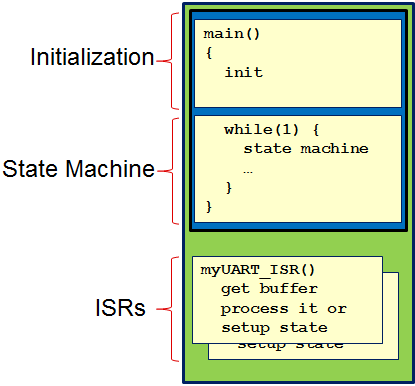
Bare-metal applications have their place. They are generally small, fast, and relatively easy to understand with a simple application. Once more complicated logic is required, an RTOS starts to shine.
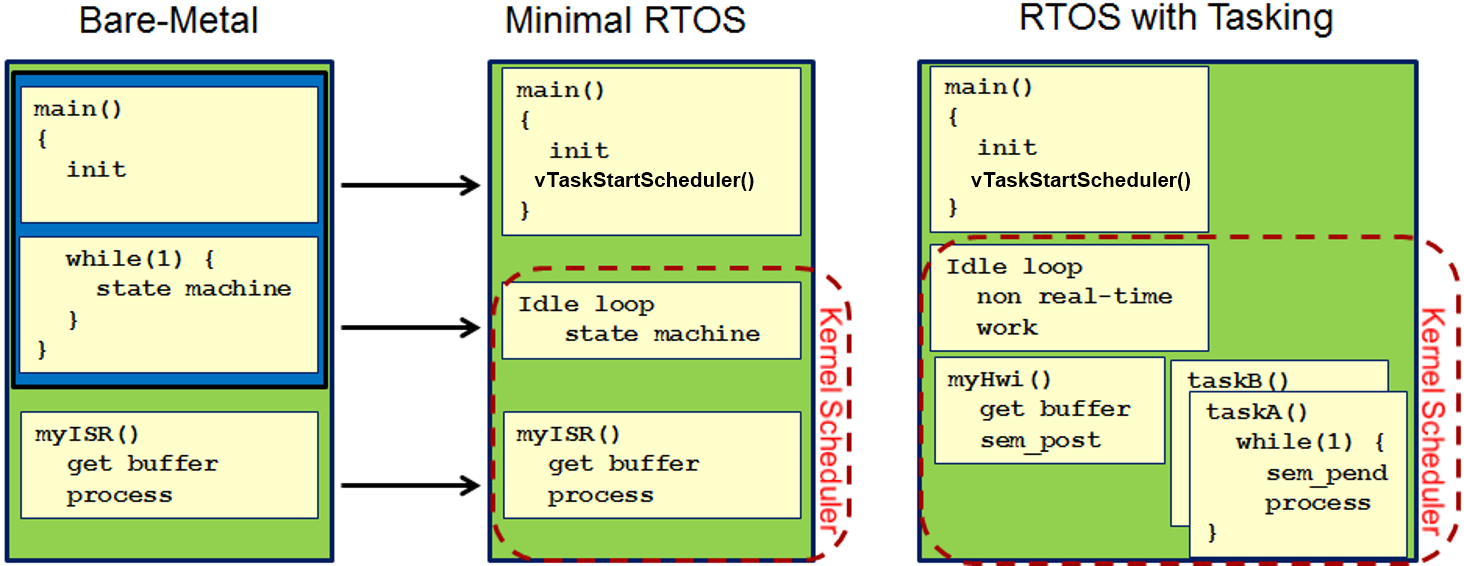
Let’s look at a comparison of a bare-metal application to a minimal RTOS application (and then to a more traditional RTOS application). As you can see, the three key pieces we talked about before (init, super-loop, and ISRs) are basically the same between a bare-metal application and a minimal RTOS application. However, with the minimal RTOS application, you now have the stepping off point to a much more complex application that allows multiple developers to add their content without dealing with a potentially fragile super-loop.
Preemptive scheduler execution#
Let’s see a preemptive scheduler in action. Let’s assume the following threads were created:
ISRX: An interrupt service routine
MidA: created first in main()with priority 4
MidB: created second in main() with priority 4
High: created last in main() with priority 8
Let’s look at the following execution graph and talk about what is happening.
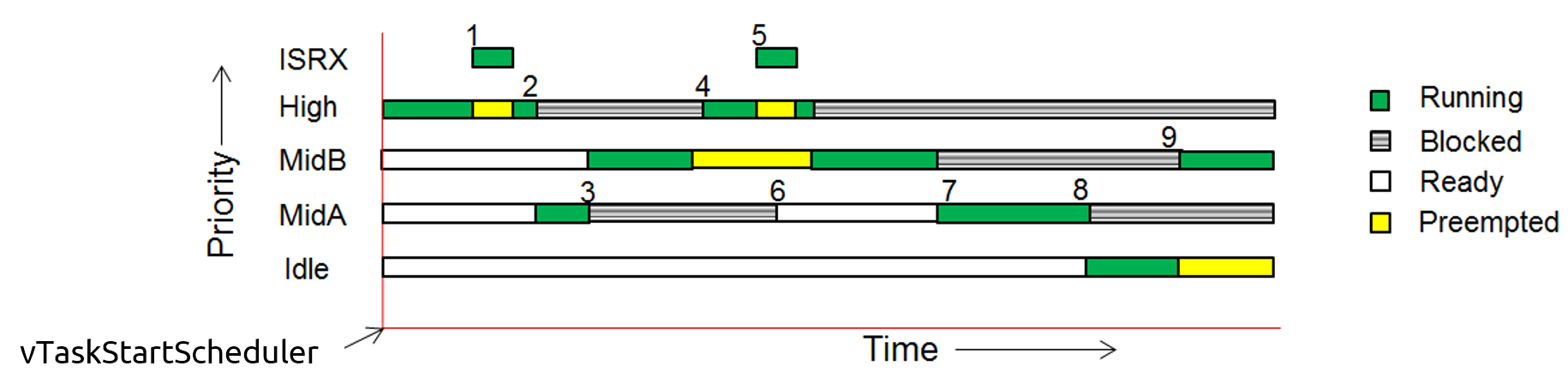
Once the kernel’s scheduler starts (in this case vTaskStartScheduler() in main()), all the tasks are ready to run, however it’s the highest task (High) that runs first since it has the highest priority and is ready to run. Here’s a description of some of the key transition points noted in the above graph.
ISRX asserts, so it preempts all tasks. High is now in a preempted state.
Once ISRX finished, High starts to run again until it blocks. Now MidA can run.
MidA runs until it hits a blocking call (say
Semaphore_pend()). Now MidB can run.MidB runs until High unblocks. MidB is now preempted.
High runs until ISRX is asserted and preempts High. Note: there are two tasks preempted now.
MidA becomes ready (say ISRX posted the semaphore it was blocked on). MidA does not run since there is a higher priority thread running.
ISRX finishes, so High runs again and then blocks again, so MidB runs again until it blocks. Now MidA can run since there are no higher priority tasks running. Note: that MidA had to wait until after MidB finished since MidB was running when MidA became ready.
MidA blocks and now there are no threads running or ready to run, so Idle finally runs until…
MidB unblocks and runs.
All of the above context switching is managed by the scheduler.
POSIX#
POSIX is an IEEE industry API standard for OS compatibility and allows for the same code to be shared by applications using different RTOS kernels. If you want your applications to have this type of portability across kernels, we recommend that you use POSIX.
The SDK provides a POSIX layer to be used on top of the FreeRTOS Kernel. For example, when a POSIX Pthread is created, an underlying FreeRTOS Task is created. Similarly, when a POSIX Pthread semaphore is created, an underlying FreeRTOS semaphore is created. This allows applications to be independent of the underlying RTOS.
The SDK provides a POSIX example application that can be used as a starting point for developing a POSIX-based application.
When to use POSIX?#
You want to write applications that can be easily ported between different RTOS options
Most commercial RTOS products offer POSIX API compatibility libraries
You are familiar with pthreads and Linux but not with RTOS usage
You want to port existing Linux application code
You want to prototype a custom application in a desktop environment before moving to an embedded platform
You are required to use POSIX APIs
Note: POSIX is not required for FreeRTOS. Applications can use the POSIX layer to allow for easily porting between operating systems, but this is not required.
Getting started with FreeRTOS in MCU+ SDK#
The FreeRTOS Empty template projects in the SDK are a good starting point to begin developing with FreeRTOS. The Empty projects are located in <SDK_INSTALL_DIR>/examples/empty
Import the FreeRTOS Empty template project#
In Resource Explorer, import the FreeRTOS Empty example in the Examples/<board>/Empty directory.
Alternatively, you can import the example from the SDK in the Examples/empty directory.
Build and run#
Click the Debug button to build and run the project. After running you should see All tests have passed!! appear in the console window.
Adding FreeRTOS to an MCU+ SDK application#
This section walks through how to add FreeRTOS to an existing MCU+ SDK application.
Step 1: Add required include paths#
The following include paths must be added to your project to use FreeRTOS Kernel APIs
${MCU_PLUS_SDK_PATH}/source/kernel/freertos/FreeRTOS-Kernel/include${MCU_PLUS_SDK_PATH}/source/kernel/freertos/portable/TI_ARM_CLANG/ARM_CR5F${MCU_PLUS_SDK_PATH}/source/kernel/freertos/config/am263x/r5f
(Optional) To use FreeRTOS + POSIX, you also need to add these paths
${MCU_PLUS_SDK_PATH}/source/kernel/freertos/FreeRTOS-POSIX/include${MCU_PLUS_SDK_PATH}/source/kernel/freertos/FreeRTOS-POSIX/include/private${MCU_PLUS_SDK_PATH}/source/kernel/freertos/FreeRTOS-POSIX/FreeRTOS-Plus-POSIX/include${MCU_PLUS_SDK_PATH}/source/kernel/freertos/FreeRTOS-POSIX/FreeRTOS-Plus-POSIX/include/portable
Step 2: Link the FreeRTOS library#
To link the FreeRTOS library, add the following library and path in your CCS project’s File Search Path window
File:
freertos.<soc>.<cpu>.<compiler>.<profile>.libFor example:
freertos.am263x.r5f.ti-arm-clang.debug.lib
Path:
${MCU_PLUS_SDK_PATH}/source/kernel/freertos/lib
Step 3: Initialize the SOC#
Initialize cache, MPU, HW interrupt as needed.
Setup one timer to tick at a frequency defined in
FreeRTOSConfig.h(typically 1ms)
Step 4: Create a task#
Create a task using xTaskCreateStatic:
gMainTask = xTaskCreateStatic( freertos_main,   /* Pointer to the function that implements the task. */
                               "freertos_main", /* Text name for the task.  This is to facilitate debugging only. */
                               MAIN_TASK_SIZE,  /* Stack depth in units of StackType_t typically uint32_t on 32b CPUs */
                              NULL,            /* We are not using the task parameter. */
                              MAIN_TASK_PRI,   /* task priority, 0 is lowest priority, configMAX_PRIORITIES-1 is highest */
                              gMainTaskStack,  /* pointer to stack base */
                              &gMainTaskObj ); /* pointer to statically allocated task object memory */
Step 5: Start the scheduler#
Start the FreeRTOS scheduler to begin task execution
vTaskStartScheduler();
More tasks and OS resources like semaphores can be created from within this task.
Configuring the FreeRTOS kernel#
The FreeRTOS Kernel can be configured to suit the needs of your device and application. This configuration is done in the FreeRTOSConfig.h file located in the SDK under source/kernel/freertos/config
The FreeRTOSConfig.h file includes configuration options such as:
Task scheduling options
Timer tick resolution
Priority count
Debug and Trace hooks
Enabling and disabling of RTOS features such as mutexes, recursive mutex, semaphore, and more
Task, timer, and idle task stack sizes
Knowledge Check#
Additional reading#
MCU+ SDK User Guide: FreeRTOS