Secure Boot Flow in AM26x devices#
8 min read
This module explains how secure boot ensures the security of the device and prevents un-authorized access.
This document only accounts for boot flow in HS-SE devices as the concept of End-to-End Secure Boot is only valid for HS-SE devices.
Boot Flow in AM26x devices#
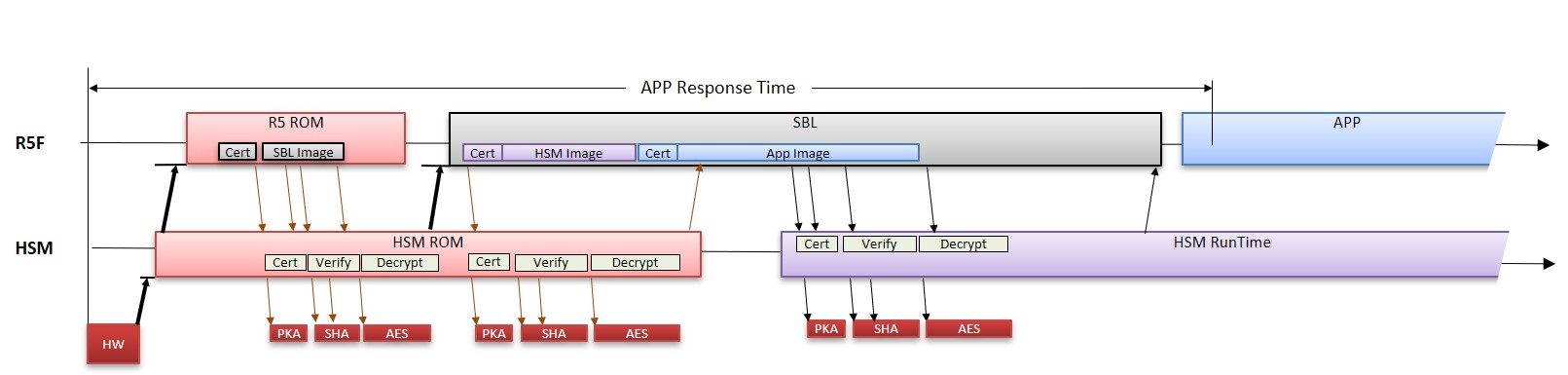
What is SBL ?#
The first-level bootloader is usually kept on secure, read-only memory for security reasons and to have a known state always before application software starts. Due to its read-only nature, the bootloader is relatively simpler to avoid future updates. This secondary bootloader can be complex and configurable to suit the needs of the application. This can also be updated easily compared to the first stage bootloader. So SBL provides an option to initialize the system to allow application boot with user-specific configurability.
What is HSMRt Firmware ?#
The HSM Run Time Firmware is a firmware running on secure island of the system i.e. Cortex M4. This application interacts with the application running on host cores via Secure IPC.
RBL boots SBL#
ROM Bootloader boots the SBL. The RBL boots the device based on the boot mode mentioned below -
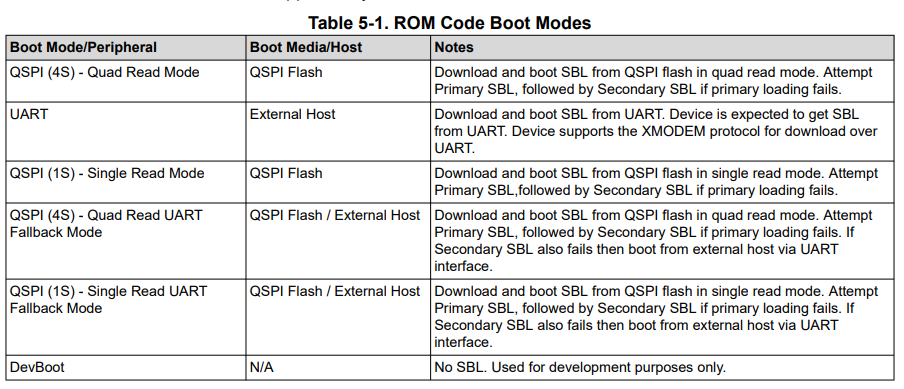
The mapping of the following boot modes to SOP (BOOTMODE pins) boot pins are mentioned in the Device Technical Reference Manual.
The authentication of SBL via Root Keys (SMPKH/BMPKH) is mandatory. As the SBL is brought in from the external world, it should be stored in encrypted format. The Encryption is done with derived key from the Symmetric Customer Root Keys (SMEK/BMEK). RBL decrypts and authenticates the SBL before starting the same. In production, the SBL is expected to be placed into the external flash.
For more details on Key Derivation scheme, click here.
Loading of TIFS-MCU#
The SBL issues a request to HSM ROM which is waiting for a request to load the HSM Run Time Firmware. The function used is Hsmclient_loadHSMRtFirmware as mentioned below -
int32_t Hsmclient_loadHSMRtFirmware	(	const uint8_t * 	pHSMRt_firmware	)
{
    int32_t  status   = SystemP_SUCCESS;
    Hsmclient_ipcLoadHSM         loadHSMImage;
    Hsmclient_ipcLoadHSMResult   loadHSMResult;
    uint16_t            orgChecksum;
    HwiP_Params hwiParams;
    HwiP_Object hwiObjReadReq;
    uint8_t *ptrMessage = (uint8_t *) CSL_HSM_MBOX_SRAM_U_BASE;

    if (pHSMRt_firmware != NULL)
    {
        /* clear any pending Interrupt */
        HwiP_clearInt(CSLR_R5FSS0_CORE0_INTR_MBOX_READ_REQ);

        /* register interrupt for Rx Mailbox */
        HwiP_Params_init(&hwiParams);
        hwiParams.intNum = CSLR_R5FSS0_CORE0_INTR_MBOX_READ_REQ;
        hwiParams.callback = Hsmclient_mboxRxISR;
        hwiParams.args = &loadHSMResult;
        hwiParams.isPulse = 0;

        status |= HwiP_construct(
            &hwiObjReadReq,
            &hwiParams);

        /* Populate the ipcExportMsgType_LOAD_HSM message header: */
        loadHSMImage.header.version  = HSMCLIENT_IPC_EXPORT_VERSION;
        loadHSMImage.header.msgType  = Hsmclient_ipcExportMsgType_LOAD_HSM;
        loadHSMImage.header.checksum = 0U;
        loadHSMImage.imgLoadAddress  = (uint32_t)((uint8_t *)pHSMRt_firmware);
        /* Compute the checksum: */
        loadHSMImage.header.checksum = Hsmclient_computeIPCChecksum ((uint8_t*)&loadHSMImage, sizeof(loadHSMImage));

        /* Copy the message: */
        memcpy ((void *)ptrMessage, (void *)&loadHSMImage, sizeof(Hsmclient_ipcLoadHSM));

        /* raise interrupt to the processor */
        CSL_FINSR (ptrMSSCtrlRegs->R5SS0_CORE0_MBOX_WRITE_DONE, 24, 24, 1U);

        /* Wait until hsmRt firmware download completes */
        while(gHsmRtDownloadComplete != 1)
        {
            ; /* wait until hsmRt download completes */
        }

        orgChecksum = loadHSMResult.header.checksum;
        loadHSMResult.header.checksum = 0U;
        /* Compute the checksum: */
        loadHSMResult.header.checksum = Hsmclient_computeIPCChecksum ((uint8_t*)&loadHSMResult, sizeof(loadHSMResult));
        /* Check for checksum match and firmware load status signature */
        if ((loadHSMResult.header.checksum != orgChecksum) && (loadHSMResult.status != Hsmclient_ipcLoadHSMStatus_SUCCESS))
        {
            /* Error: Invalid checksum */
            status = SystemP_FAILURE;
        }

        HwiP_destruct(&hwiObjReadReq);
    }
    else
    {
        /* Error: Invalid load address */
        status = SystemP_FAILURE;
    }

    return status;
}
HSM ROM verifies the authenticity of TIFS-MCU firmware via Root Keys (SMPKH/BMPKH). After the firmware is verified, HSM ROM decrypts the firmware into the internal SRAM of HSM. After the firmware is decrypted, the HSM ROM performs the HSM Eclipse to start the functioning of the HSM Run Time Image.
Note
Eclipse is a mechanism in which the ROM completely shuts-off (and should not be reopened again in the current reset cycle) and the memory is remapped with HSM Run Time RAM memory. For more details checkout the section Address Mapping when ROM is not eclipsed and Address Mapping when ROM is eclipsed in Secure Boot Flow of Hardware Security Addendum.
The TIFS-MCU firmware initializes an HSM Server and SBL here is an HSM Client. After the TIFS-MCU initializes the CPU, initializes the HSM MBOX to support SIPC, configures the boot time firewall and then sends the Boot Notify.
Loading and Verification of Application Software#
The Application software is loaded and verified by SBL. But SBL does not have access to Keys which are managed by TIFS-MCU Firmware. So, the TIFS-MCU firmware provides services to verify the Application Images via Root Keys. link to Secure Boot Documentation.
After the verified and decrypted images are copied into the Internal RAM. The Application based on their respective CPU will be released from the reset.
Appendix (Key Usage during Boot)#
SW |
Key Revision |
Operation |
Support |
Key Used |
|---|---|---|---|---|
HS-FS |
||||
SBL |
N.A |
Authentication |
Yes |
Any Public Key |
N.A |
Encryption |
No |
N.A |
|
TIFS |
N.A |
Authentication |
Yes |
TI-MPK |
N.A |
Encryption |
Yes |
TI-MEK |
|
HS-SE |
||||
SBL |
1 |
Authentication |
Yes |
SMPK |
1 |
Encryption |
Yes |
SMEK |
|
2 |
Authentication |
Yes |
BMPK |
|
2 |
Encryption |
Yes |
BMEK |
|
TIFS |
1 |
Authentication |
Yes |
SMPK |
1 |
Encryption |
Yes |
SMEK |
|
2 |
Authentication |
Yes |
BMPK |
|
2 |
Encryption |
Yes |
BMEK |
|
Steps to do Secure Boot with TIFS-MCU Firmware#
Step 1 - Make sure the device is HS-SE : Use the uart_soc_id_parser to identify if the device is HS-FS or HS-SE. To check the lifecycle of the current device you can use the following FAQ.
Step 2 - Make sure to build TIFS-MCU HSM Firmware : The SDK is always released with HSM Run Time Firmware for HS-FS devices. After the tifs package is downloaded, the user should follow the steps to build the TIFS-MCU HSM Firmware.
Step 3 - Rebuilding the SBL : After the TIFS-MCU Firmware is built successfully, the user should build the SBL. Steps to build the SBL are mentioned here.
Step 4 - Rebuilding the Application : The Application image should be converted to secure image. Steps to build the Secure Application Image are mentioned here.
Step 5 - Flashing of the Application in xSPI (if applicable) : The flashing of the SBL is mentioned here.
Boot in Automotive Applications for AM26x devices#
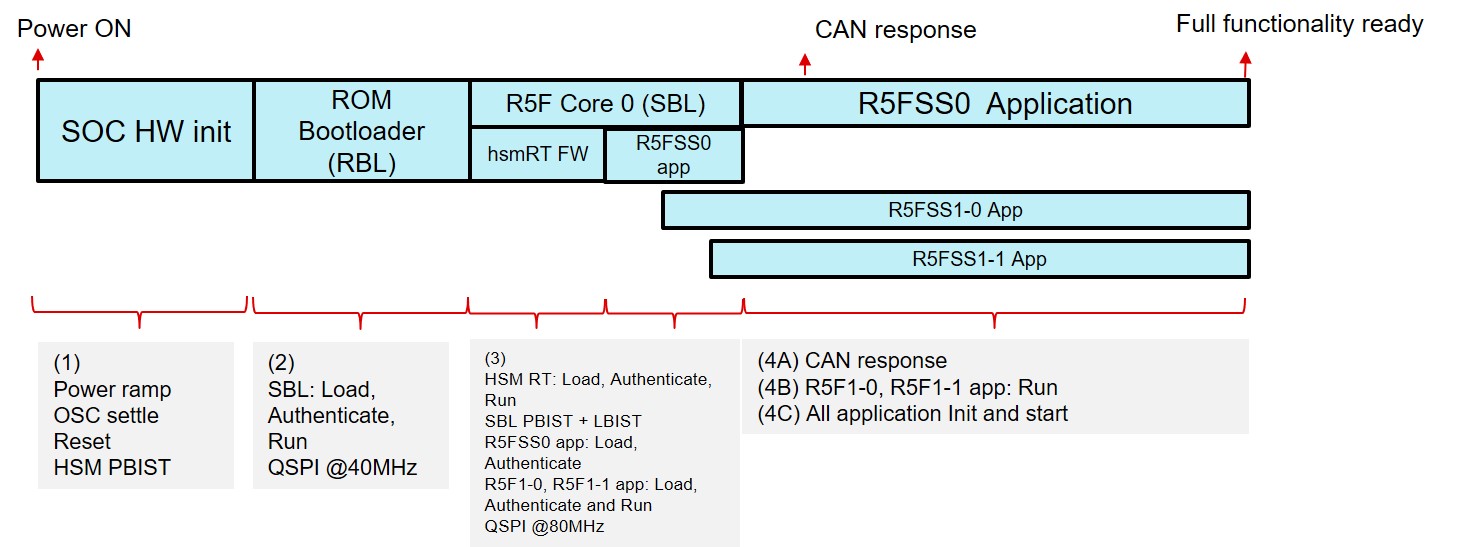
This is an classic example of how automotive applications can be booted securely in AM26x devices.
Stage 1 - RBL boots SBL : ROM Bootloader boots the SBL by reading from external flash. The SBL on the flash is stored in encrypted format. It is encrypted with derived key of the Symmetric Customer Root Keys (SMEK/BMEK). RBL decrypts and authenticates the SBL before executing the same.
Stage 2 - SBL boots the HSM Run Time : Post system initialization (Running the system at 400MHz and QSPI at 80MHz) the SBL Bootloader loads the HSM Run Time by reading from external flash. Just like SBL, HSM Run Time on the flash is also stored in encrypted format. It is also encrypted with derived key of Symmetric Customer Root Keys (SMEK/BMEK). HSM ROM decrypts and authenticates the HSM Run Time when SBL sends an Secure IPC message to HSM ROM before executing the same.
Application Cores |
Application Running |
|---|---|
R5F0-0 |
AUTOSAR Application (lockstep) |
R5F0-1 |
|
R5F1-0 |
Control loop Application 1 |
R5F1-1 |
Control loop Application 2 |
Stage 3 - SBL loads the applications for R5F1-0 and R5F1-1 : The SBL loads the R5F1-0 and R5F1-1 applications into the internal memory. The Applications are also stored in encrypted format in the flash. They need to be verified via HSM Run Time.
Stage 4 - SBL loads the Application for R5FSS0 and HSM Run Time verifies the Application for R5F1-0 and R5F1-1 : SBL issues requests to HSM Run Time to verify the R5F1-0 and R5F1-1. In the mean time the SBL loads the R5FSS0 application into the internal memory.
Stage 5 - HSM Run Time verifies the Application for R5FSS0 and SBL runs the Application for other cores : SBL issues requests to HSM Run Time to verify the R5FSS0 Application and also runs the applications for other cores.
Note
The keys used to decrypt and verify the application can be independent of Root Keys depending on the user use case and level of security.
Stage 6 - SBL runs the AUTOSAR Applications : SBL runs the applications for AUTOSAR core which sends the first CAN message.
List of important links -#
Collateral Title |
Collateral Type |
Collateral Link |
|---|---|---|
Understand the bootloaders/SBL in SDK |
MCU+ SDK Documentation |
|
Understanding the Secure Boot via SDK |
MCU+ SDK Documentation |
|
How to build TIFS-MCU Firmware for HS-SE devices |
TIFS-MCU Documentation |
|
How to re-build SBL for HS-SE devices |
TIFS-MCU Documentation |
|
How to flash in case of HS-SE devices |
TIFS-MCU Documentation |
|
How to convert *.out file format of HSM Run Time Firmware to RBL accepted format |
TIFS-MCU Documentation |