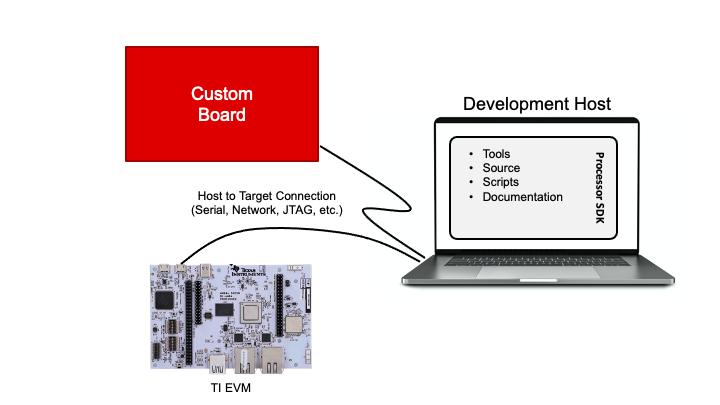
The Linux development environment is similar for all types of
hardware. Thus, many software features can be developed on a TI EVM even before
the custom hardware board is ready. The differences between the available TI
boards and the target system will dictate how much software development can be
done without custom hardware.
Some software requires features that are not enabled on TI EVMs. In
that case, new custom hardware must be developed before the software can be
validated. Once new hardware comes into the picture, the
exciting task of porting Linux to a custom platform can begin. The porting
process is discussed in module Porting Linux to Custom Hardware.
For example, if the target system uses networking, software above the network
interface (eth0, eth1, etc.) can usually be developed on TI boards as most TI
boards have network interfaces. This hardware abstraction is one of the benefits
of Linux, and allows software development to overlap hardware development
to shorten total system design timelines.
The rest of this module describes how to set up a good development environment.
This environment will enable users to make changes to the SDK components
(U-Boot, Linux, etc.). This environment also enables the development
of application code like a simple “Hello World” and beyond.
Development Host
This module briefly discusses about development host setup.
Linux Boot Flow
This module illustrates the Linux boot flow.
Build U-Boot
This module explains how to compile U-Boot.
Build Kernel
This module explains how to compile kernel.
Root Filesystem
This module introduces the root filesystems provided in the Processor SDK Linux package.
Boot Mode
This module will discuss and reference to different bootmode supported.
SD Card Boot
This modules explains SD card boot mode.
DFU Boot
This module covers the DFU Boot Mode, also known as USB Peripheral boot.
EVM Boot Mode Switches
This section provides the boot mode switch settings for a few commonly used boot modes.
Flash Linux
This section describes different ways to program Linux (U-Boot, Kernel, DTS,
filesystem, etc.) to different flash memories (OSPI, eMMC, etc.).
Overview
Overview of flashing Linux.
Flash Linux to eMMC
This section describes how to install a full Linux system to eMMC so that Linux
can boot completely from eMMC.
First “Hello World” Program
This section
describes how to compile a simple “Hello world” C program to run on the target.
Kernel Parameters
This module demonstrates how to modify the kernel command line to change various features
at boot time.
Use Device Drivers
The submodules will describe how you can go about using different device drivers.
Use UART
This module focuses on the usage and applications of the UART peripheral.
Use USB in Device Mode
This module explains how you can go about using USB on TI EVMs.