Add Linux IPC to the remote core project#
The easiest way to add a resource table to an MCU+ project is to enable IPC with Linux.
The MCU+ drivers generate a resource table during the “make” process if Linux IPC is selected in the SysConfig file for the MCU+ core project.
First, open the SysConfig settings for the project, as described at How to open a project’s SysConfig settings.
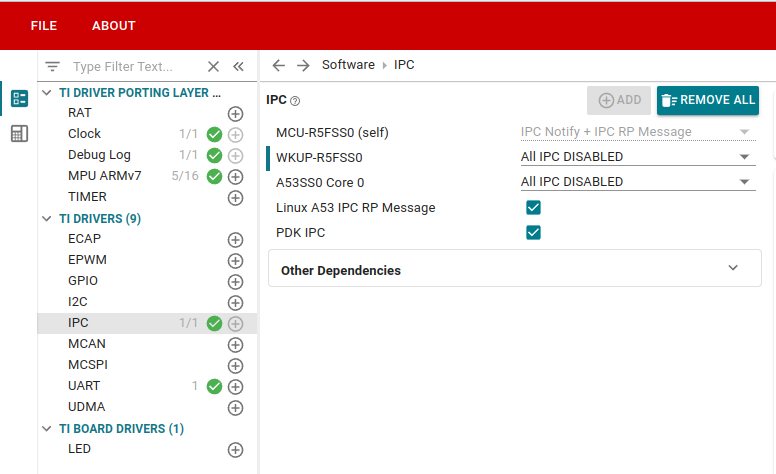
Go to “TI DRIVERS” and add the “IPC” driver. Then enable “Linux A53 IPC RP Message”. Note that the entry “A53SS0 Core 0” does NOT refer to Linux. That entry refers to MCU+ SDK running on an A53 core. Since we are running Linux on the A53 cores, make sure that the “A53SS0” entry is set to “ALL IPC DISABLED”.
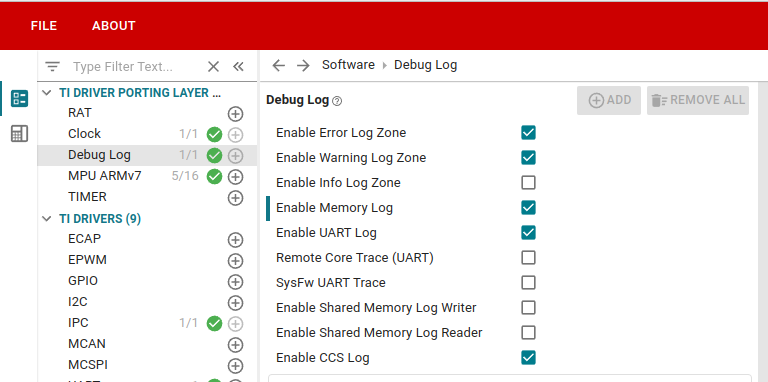
It can also be helpful for debugging to go to “TI DRIVER PORTING LAYER” > Debug Log and enable “Enable Memory Log”.
Save the SysConfig setting changes by selecting FILE > save.
The SysConfig file at <path_to_project>/board/<remote_core>/example.sysconfig should look something like this:
AM62Px-SDK-9.2-Add-Linux-IPC-to-SysConfig.patch
For more details, reference Understanding inter-processor communication (IPC), section “Enable IPC in SysConfig”