Introduction#
All the SimpleLink™ Software Development Kits (SDKs) include the ability to use FreeRTOS™ (as well as the TI-RTOS7). This workshop will explain what this really means.
Here’s what we’ll learn:
How TI Drivers work with FreeRTOS
POSIX support with FreeRTOS
Understand parts of FreeRTOS kernel projects
Prerequisites#
Recommended Background Reading#
It is strongly recommended that you are familiar with the following item:
FreeRTOS Installation#
Just to be very clear and not surprise you at the end, the FreeRTOS kernel is not bundled into the SimpleLink SDK. You’ll need to download FreeRTOS yourself from www.freertos.org. Please refer to the <SimpleLink_SDK_Install_Dir>/docs/Documentation_Overview.html file to find the “Quick Start Guide” and “Release Notes” for the recommended version and how to plug FreeRTOS into your IDE.
The latest SDK
Refer to Simplelink SDK User’s Guide
Refer to TI-RTOS7 Kernerl User’s Guide
Refer to TI-POSIX User’s Guide
FreeRTOS Components In SimpleLink SDK#
This workshop will cover the following sections to help you get your application working with FreeRTOS and the SimpleLink SDK.
POSIX support for FreeRTOS
TI Drivers working with FreeRTOS
Projects to build FreeRTOS kernel
FreeRTOS examples
Let’s go into more details on each one of these items. We’ll focus on CCS, but the same concepts apply to IAR and commandline makefiles.
POSIX Support#
Portable Operating System Interface (POSIX) is an IEEE industry API standard for OS compatibility. The SimpleLink SDK provides support for POSIX APIs on top of FreeRTOS (as it does for TI-RTOS7). For a more detailed description of the POSIX support in SimpleLink SDKs, please refer to the POSIX Overview Workshop.
For more information refer to TI-RTOS7 Kernel User’s Guide
For more information refer to TI-POSIX User’s Guide
TI Drivers#
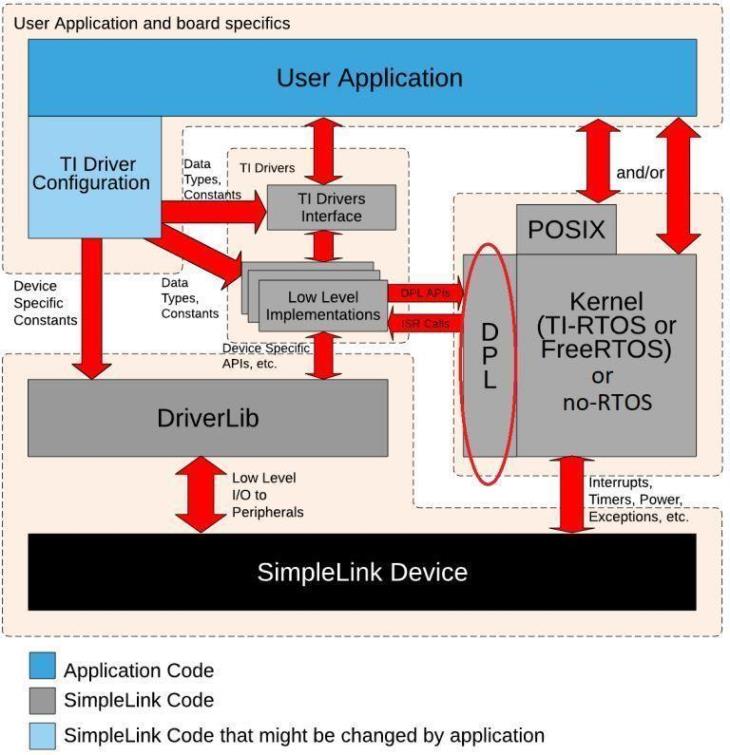
The TI Drivers (e.g. UART2, I2C, Power Management, etc.) are written to be used with the Driver Porting Layer (DPL). The SimpleLink SDK includes a DPL implementation for both FreeRTOS, TI-RTOS7 and no RTOS.
Warning
DPL is not a full-feature Operating System Abstraction Layer (OSAL) It was developed specifically to meet the needs of TI Drivers. Therefore, it is not recommended that application code use the DPL interface directly. SimpleLink SDK reserves the right to change the DPL (and all the driver implementations). For application code that wants OS abstraction, please use POSIX APIs, not DPL.
Other SimpleLink SDK Components#
FreeRTOS is supported by other SDK components (e.g. third_party\fatfs, ti\display) unless otherwise noted.
Kernel Projects#
The FreeRTOS kernel is built via a provided project. The examples that are FreeRTOS-based (e.g. TI Drivers examples) point to the kernel project.
In CCS and IAR, the kernel project requires that FREERTOS_INSTALL_DIR be defined. Please refer to the SimpleLink SDK Quick Start Guide for details on how to set this up.
Error
Build failure FREERTOS_INSTALL_DIR must be set up to build any FreeRTOS example.
The SDK provides the kernel project in the kernel/freertos/builds/*BOARD*/release directory.
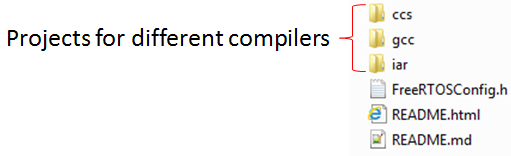
The configuration of the FreeRTOS kernel is done in the FreeRTOSConfig.h file.
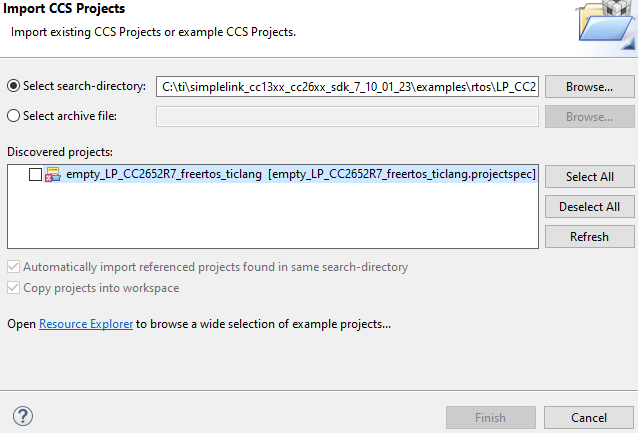
Alternatively, this project can be imported into CCS by selection Project → Import CCS Projects… and navigating to the <SimpleLink_SDK_Install_Dir>/kernel/freertos/builds directory. Then select the desired board and compiler project.
Here is what the imported kernel project looks like. You see the FreeRTOSConfig.h file. The dpl and posix directories contain the files in the SimpleLink SDK to support those features. The freertos directory contains files in the FreeRTOS installation (which FREERTOS_INSTALL_DIR points to).
The result of building this project is a library that can be used for building the FreeRTOS based examples.
For more details on how to change or create new FreeRTOS kernel projects, please refer to the SimpleLink SDK User Guide.
Examples#
Many examples (e.g. TI Drivers examples) are available in both FreeRTOS and TI-RTOS7. When a FreeRTOS example is imported and built without properly defining the FreeRTOS directory in linked resoruces you get an error, and the build will not compile.
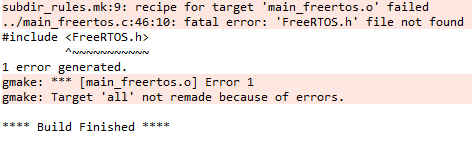
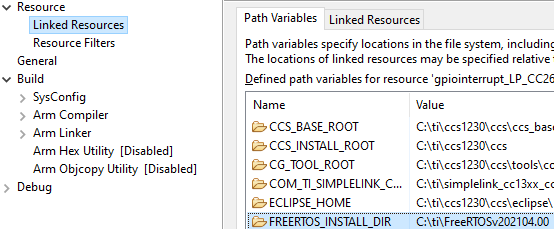
Remember to double check your Linked Resources and confirm that FREERTOS_INSTALL_DIR appears correctly in order to resolve the build compile error.
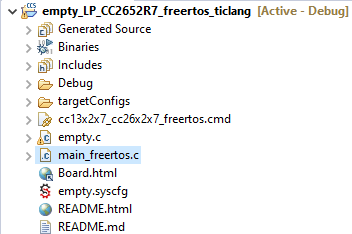
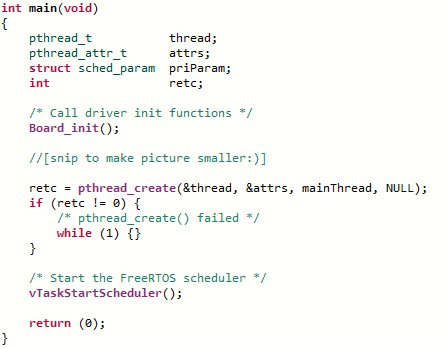
There are no native FreeRTOS examples in the SimpleLink SDK (except for portableNative). Instead, the POSIX layer allows examples to be used with TI-RTOS7 or FreeRTOS. All the FreeRTOS-specific code is in main_freertos.c file (while there is a main_tirtos.c file for TI-RTOS7 based examples). The majority of the file contains POSIX APIs, but at the end of main(), a call is made to start the FreeRTOS scheduler (vTaskStartScheduler()).
Additionally, the main_freertos.c file contains FreeRTOS hook functions.
The linker command file is also slightly different from the TI-RTOS7 one in how it sets up the dynamic heap.
Note
POSIX is not required for FreeRTOS
Even though almost all FreeRTOS examples use POSIX in the SimpleLink SDK, it is not required. This was done to ensure that the examples worked for both operating systems. You can use the native FreeRTOS APIs instead if you prefer. Please refer to the demos\portable and demos\portableNative examples to see a comparison of using POSIX vs the native RTOS APIs.
Debug Tools#
There are kernel tools available for FreeRTOS
Runtime Object View in CCS
Stateviewer
Note: The SDK does not supply a mechanism for naming pthreads on top of FreeRTOS.
Runtime Object View in CCS#
Runtime Object View in CCS (Tools->Runtime Object View) supports views of the FreeRTOS kernel.
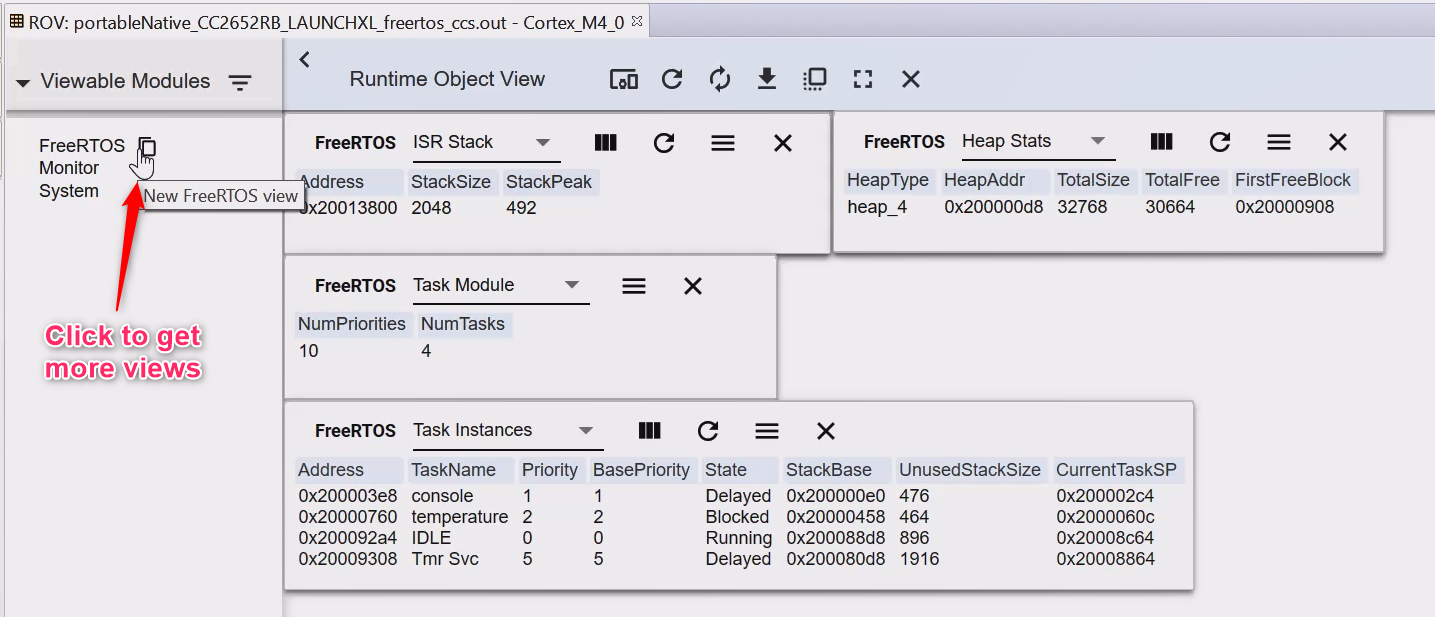
Note: for POSIX based examples, an ‘x’ is used for the underlying FreeRTOS task name.
For more details about Runtime Object View, please refer to ROV FAQ
Stateviewer#
CCS supports Eclipse-based plug-ins to aid in FreeRTOS debugging. For example: HighIntegritySystems Stateviewer.
An example of this plug-in’s Task View when used with the portableNative
example:

Lab: Getting started#
This lab will explore some of the configuration parameters of FreeRTOS.
Software#
CCS as specified by your SimpleLink SDK Release Notes (CCS Cloud is also possible, but the steps below will assume you are using the desktop CCS)
Any SimpleLink SDK
Note
In order for the example code to function correctly the compiler needs to be changed from “z” to “0”, otherwise the compiler will overlook some of our changes, optimizing out the buf/malloc; follow the steps below in order to rectify the issue, as well as make the example more universal between the device families.
To modify the FreeRTOSConfig.h file you first need to unlink the file from the autogeneration from sysconfig, follow the following to disable autogeneration empty.syscfg > FreeRTOS > show generated files > slide FreeRTOSConfig.h to not include in build; this will exclude the file from auto generation and allow the modification of the ‘FreeRTOSConfig.h’ file.
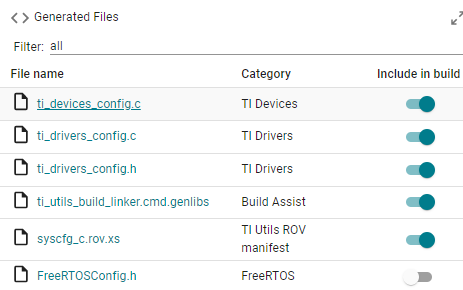
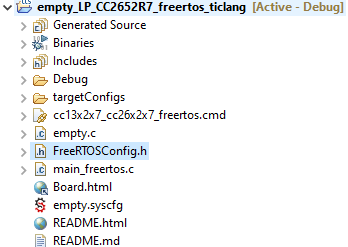
Now to you will need to move the FreeRTOSConfig.h out debug (after building the project at least once) follow debug > syscfg > select FreeRTOSConfig.h to move the file out of sysconfig to the header of the project, as shown in the image.
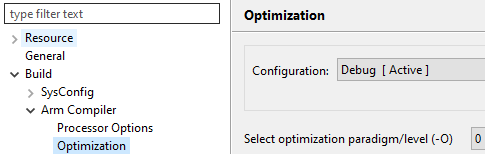
Finally change the compiler optimizer from “z” to “0”, follow these steps: right click the project > properties > build > arm compiler > optimization > select optimization paradigm/level change “z” to “0”.
Hardware#
Task 1: Import FreeRTOS Empty Driver Project#
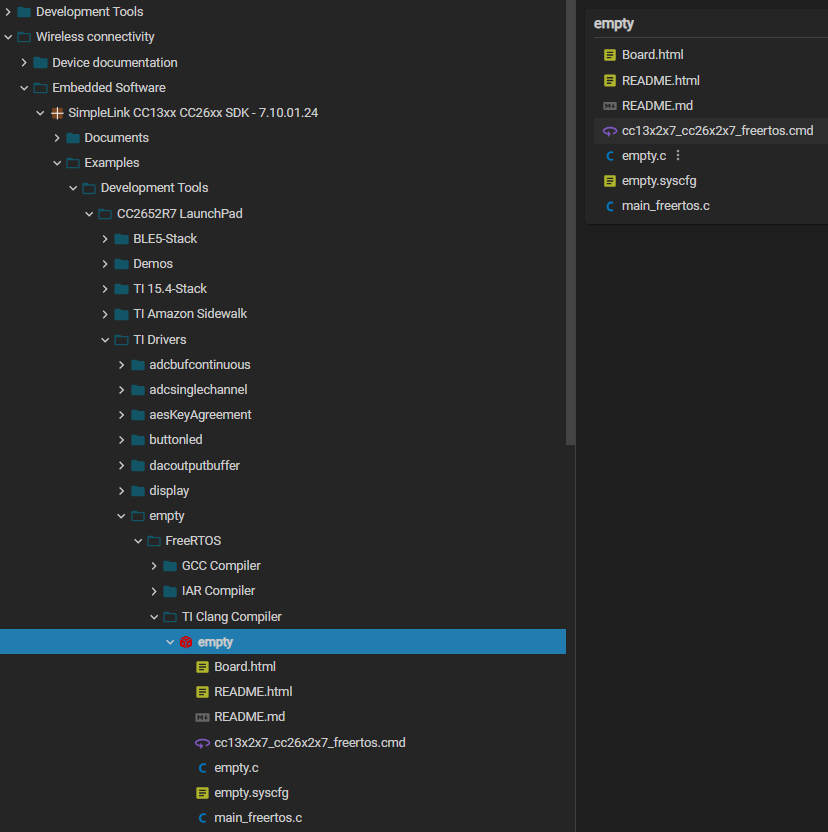
In Resource Explorer, import the FreeRTOS empty example in examples/rtos/*Board*/drivers/empty directory. You can select from GCC, IAR, or TI Clang Compiler.
Task 2: Add a bogus malloc()#
In empty.c at the beginning of mainThread(), add an allocation of a very large size (e.g. malloc(0x80000)).
void *mainThread(void *arg0)
{
    char *buf;
    buf = malloc(0x80000);
    if (buf != 0)
    {
       GPIO_write(CONFIG_GPIO_LED_0, 1);
    }
    return (0);
}
Task 3: Modify FreeRTOSConfig.h#
Let’s add the malloc failure hook function feature into FreeRTOS. This is done
by editing FreeRTOSConfig.h in the kernel project. Please change the 0 to
a 1 for the configUSE_MALLOC_FAILED_HOOK constant.
#define configUSE_MALLOC_FAILED_HOOK 1
Task 4: Add Hook Function#
In empty.c at the bottom of the file, add following hook function.
void vApplicationMallocFailedHook()
{
    /* Handle Memory Allocation Errors */
    while(1)
    {
        GPIO_write(CONFIG_GPIO_LED_0, 0);
    }
}
Task 5: Build#
Build and load the project. Before you run, set a hardware breakpoint in the vApplicationMallocFailedHook() function in main_freertos.c.
Warning
If you still do not have the FREERTOS_INSTALL_DIR set you’ll get a build error. Please refer to the SimpleLink SDK Quick Start Guide, or the Example header above for details on how to set this up.
Task 6: Run#
Run the application. You should be in vApplicationMallocFailedHook() now.
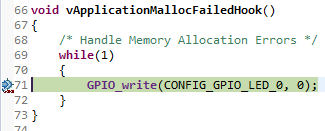
What happened? You tried to allocate too big of a block of memory and the malloc
falled. The configUSE_MALLOC_FAILED_HOOK is set to 1 in FreeRTOSConfig.h in
the FreeRTOS kernel project. Therefore, if an allocation failure occurs, the
vApplicationMallocFailedHook() is called.
Try running the project without debug, and notice that the Red LED is off. This means that the program has entered the vApplicationMallocFailedHook(), and set the Red LED to zero.
Let’s see how much memory we have in the heap. Open
Tools->Runtime Object View. Select FreeRTOS and in the new view, select
Heap Stats.
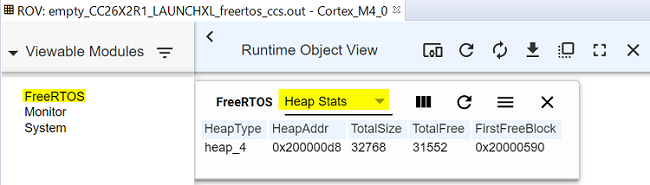
As you can see 0x80000 is larger than 31552 (depending on your device, the size might be different), so it makes sense the hook function was called.
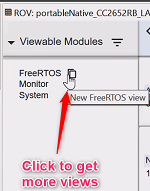
Note: to open additional FreeRTOS views (e.g. Task Instances), select the
view icon slightly to the right of FreeRTOS.
Task 7: Remove the hook function#
Edit the FreeRTOSConfig.h file in the FreeRTOS kernel project and change
configUSE_MALLOC_FAILED_HOOK to back 0.
#define configUSE_MALLOC_FAILED_HOOK 0
Task 8: Build and run#
Build and load the empty project. Now step over the malloc() call and you see that
The hook function was not called.
The
malloc()call returned NULL.
Now run the project again without debug, notice that this time the Red LED stays on, indicating that vApplicationMallocFailedHook() has not been called, and malloc() has returned NULL.
Quizzes#
Let’s see if you picked up some key points…
Additional Resources#
Additional training and reference material for FreeRTOS is available in the following places:
General FreeRTOS Support
SimpleLink Academy
SimpleLink SDK
TI Drivers APIs
Forums