## Introduction
In this module, you will learn how to add the IPC Notify driver to an MCU+ SDK application.
<br>
The IPC Notify module is designed for low-latency communication between different cores on a device. The low-latency IPC APIs are constrained in features but offer fast transfer rates of messages between two cores.
With IPC Notify, one core interrupts or "notifies" another core using the device's hardware interrupt mechanism. This mechanism may differ between devices.
Along with the hardware interrupt, a message and "Client ID" is sent to the other core. The Client ID is used to identify a specific client on the receiving side - this allows for having multiple communication channels on the same core.
* The maximum message size that can be sent is defined by `IPC_NOTIFY_MSG_VALUE_MAX` in `<SDK_INSTALL_DIR>\source\drivers\ipc_notify.h.`
* The maximum number of concurrent clients is defined by `IPC_NOTIFY_CLIENT_ID_MAX` in `<SDK_INSTALL_DIR>\source\drivers\ipc_notify.h.`
<hr>
## IPC Notify Example
<br>
IPC Notify can be used with either FreeRTOS or NoRTOS.
The SDK provides a `IPC Notify Echo` example that demonstrates sending and receiving of 28 byte messages between all cores on the device.
One "main" core sends messages to all of the other cores, and the other cores receive the message and echo it back to the main core.
<hr>
## Adding IPC Notify to an MCU+ SDK Application
This tutorial will go over how to add the IPC Notify between two cores. We will be using the "empty" system project as the starting point but will be only using the R50-0 and R51-0 cores for this tutorial. The same steps can be applied to extend to other cores.
<br>
### Step 1: Add an IPC Notify instance for each core
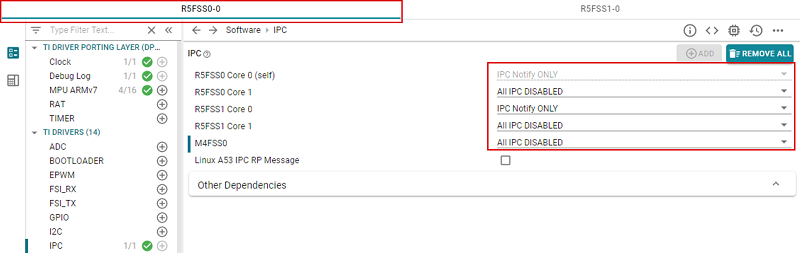
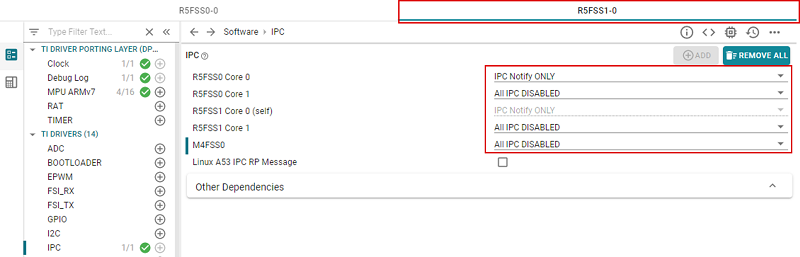
To use the IPC Notify driver, we need to add an instance on each core. For this tutorial we will be using the R5F0-0 and R5F1-0 cores.
<br/>
<hr>
#### a. Click on **IPC** and click **ADD** to add an IPC instance
<hr style="width:50%; margin: auto;" />
#### b. Set the cores you want to use to **IPC Notify ONLY**
<br/>
<br/>
<hr>
<br/>
### Step 2: Include the IPC Notify header file
We need to add the IPC Notify header file to use the IPC Notify APIs
<br/>
<hr>
#### a. First, rename `empty.c` to `ipc_notify.c`
<hr style="width:50%; margin: auto;" />
#### b. Add the include path to `ipc_notify.c`
<br/>
```c
#include <drivers/ipc_notify.h>
```
<hr>
<br/>
### Step 3: Define a client ID
Define a **unique client ID** to be used to specify a communication channel. This gives us the flexibility to have more than one communication channel between the same two cores.
```c
uint32_t gClientId = 4u;
```
<hr>
<br/>
### Step 4: Create and register a callback function
The callback function is used for handling received messages. This needs to be created for the core reading the messages and needs to be unique for each **communication channel.**
<br/>
<hr>
#### a. Create a callback function to handle the received message
```c
void ipc_notify_msg_handler_main_core(uint32_t remoteCoreId, uint16_t localClientId, uint32_t msgValue, void *args)
{
//read msgValue here
}
```
<hr style="width:50%; margin: auto;" />
#### b. Register the callback function
```c
status = IpcNotify_registerClient(gClientId, ipc_notify_msg_handler_main_core, NULL);
DebugP_assert(status==SystemP_SUCCESS);
```
<hr>
<br/>
### Step 5: Synchronize the cores
```c
/* wait for all cores to be ready */
IpcNotify_syncAll(SystemP_WAIT_FOREVER);
```
<hr>
<br/>
### Step 6: Send a message
```c
uint32_t msgValue = 0;
uint32_t waitForFifoNotFull = 1;
/* send message's to all participating core's, wait for message to be put in HW FIFO */
status = IpcNotify_sendMsg(gRemoteCoreId[i], gClientId, msgValue, waitForFifoNotFull);
DebugP_assert(status==SystemP_SUCCESS);
```
<br/>
#### On the reader core, the callback function will be entered as soon as the message is received
<hr>
<br/>
### (Optional) Step 7: Repeat these steps to extend IPC Notify to other cores on your device
<br/>
<hr>
## Congratulations!
<br>
You have learned how to add the IPC Notify driver to an MCU+ SDK application. To add more robustness to your application, you can incorporate semaphores and error-checking with IPC Notify. Take a look at the `IPC Notify Echo` example in the MCU+ SDK under `examples/drivers/ipc` for an example of this.
<br/>
<hr>
## Additional Reading
<br>
##### MCU+ SDK User Guide: [IPC Notify](https://software-dl.ti.com/mcu-plus-sdk/esd/AM243X/latest/exports/docs/api_guide_am243x/DRIVERS_IPC_NOTIFY_PAGE.html)
##### MCU+ SDK User Guide: [Understanding inter-processor communication (IPC)](https://software-dl.ti.com/mcu-plus-sdk/esd/AM243X/latest/exports/docs/api_guide_am243x/IPC_GUIDE.html)
<br/>
<hr>
{{r> [Back to Home](../overview.html)}}
{{r **Was this helpful? Let us know here:** [mcu_plus_academy_feedback@list.ti.com](mailto:mcu_plus_academy_feedback@list.ti.com)}}
<div align="center" style="margin-top: 4em; font-size: smaller;">
<a rel="license" href="https://creativecommons.org/licenses/by-nc-nd/4.0/"><img alt="Creative Commons License"
style="border-width:0" src="..//web_support/cc_license_icon.png" /></a><br />This work is licensed under a <a
rel="license" href="https://creativecommons.org/licenses/by-nc-nd/4.0/">Creative Commons
Attribution-NonCommercial-NoDerivatives 4.0 International License</a>.</div>