## Introduction
<br>
PROFINET is a real-time Ethernet standard for the high-speed, deterministic communications required for a wide range of industrial applications including factory automation, process automation and building automation.
Originally developed under the leadership of Siemens GmbH as a network extension to the popular PROFIBUS fieldbus technology, PROFINET is now supported by PROFIBUS & PROFINET International.
In 2003, PROFINET was integrated into the IEC 61158 and IEC 61784 standards.
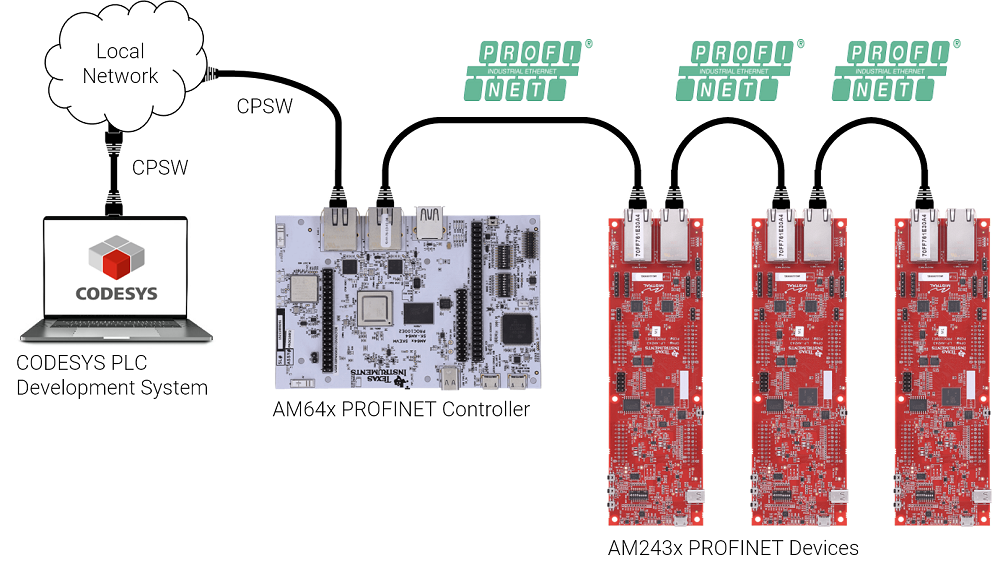
This module describes how to setup PROFINET RT communication between an AM243x PROFINET Device and an AM64x PROFINET Controller using CODESYS. AM64x can also be used as a PROFINET Device.
<hr>
## Test Environment Example Diagram
<br>
<hr>
## What You Will Need
<br>
### Hardware
<br>
#### PROFINET Device
* [AM243x LaunchPad](https://www.ti.com/tool/LP-AM243) or [AM243x General Purpose EVM](https://www.ti.com/tool/TMDS243GPEVM) or [AM64x General Purpose EVM](https://www.ti.com/tool/TMDS64GPEVM)
* Windows or Linux PC
<br>
#### PROFINET Controller
* [AM64x Starter Kit](https://www.ti.com/tool/SK-AM64) or [AM64x General Purpose EVM](https://www.ti.com/tool/TMDS64GPEVM)
* Windows PC
<br>
<hr style="width:50%; margin: auto;" />
<br>
### Software
<br>
#### PROFINET Device
* [MCU+ SDK for AM243x](https://www.ti.com/tool/MCU-PLUS-SDK-AM243X) or [MCU+ SDK for AM64x](https://www.ti.com/tool/download/MCU-PLUS-SDK-AM64X)
* [Code Composer Studio](https://www.ti.com/tool/CCSTUDIO)
<br>
#### PROFINET Controller
* [AM64x Linux-RT SDK](https://www.ti.com/tool/PROCESSOR-SDK-AM64X)
* [Codesys Control package for 64-bit ARM](https://us.store.codesys.com/codesys-control-for-linux-arm-sl-bundle.html)
* [Codesys Development System](https://us.store.codesys.com/codesys.html)
<hr>
## Setting Up and Running The PROFINET Device
<br>
* Setup your AM243x or AM64x as the PROFINET Device as described in the MCU+ SDK docs:
* [Quickstart - AM243x PROFINET Device](http://tigt_qa.dal.englab.ti.com/qacm/test_area/MCU_PLUS_SDK/08.01.00/am243x/08_01_00_32/exports/docs/industrial_protocol_docs/am243x/profinet_device/page_quickstart_ti.html)
* [Quickstart - AM64x PROFINET Device](http://tigt_qa.dal.englab.ti.com/qacm/test_area/MCU_PLUS_SDK/08.01.00/am64x/08_01_00_32/exports/docs/industrial_protocol_docs/am64x/profinet_device/page_quickstart_ti.html)
<hr>
## Setting Up and Running The PROFINET Controller
<br>
* Setup your AM64x EVM running Linux-RT as described in the Quick Start Guide up to the "Booting Linux" section..
* [AM64x Starter Kit EVM Quick Start Guide](https://dev.ti.com/tirex/explore/node?node=ABAdBPmmXTJLfIV43c2tDA__FUz-xrs__LATEST)
* [AM64x General Purpose EVM Quick Start Guide](https://dev.ti.com/tirex/explore/node?node=AKP4hRPpxVP9PFnH21Uk4Q__FUz-xrs__LATEST)
* Setup the AM64x PROFINET Controller by following these steps in the MCU+ SDK docs: [Connect to PLC - CODESYS](http://tigt_qa.dal.englab.ti.com/qacm/test_area/MCU_PLUS_SDK/08.01.00/am243x/08_01_00_32/exports/docs/industrial_protocol_docs/am243x/profinet_device/plc_codesys_am64x.html)
Note: The MCU+ SDK also provides guidance on setting up a Siemens controller as the PROFINET Controller here: [Connect to PLC - Siemens](http://tigt_qa.dal.englab.ti.com/qacm/test_area/MCU_PLUS_SDK/08.01.00/am243x/08_01_00_32/exports/docs/industrial_protocol_docs/am243x/profinet_device/plc_siemens.html)
<br>
<hr>
## See Also
<br>
#### For further information on industrial protocols available on Sitara processors and MCUs and how they can be enabled on your production project, see:
[Industrial Communication Protocols Supported on Sitara™ Processors and MCUs Application Note](https://www.ti.com/lit/pdf/sprach6)
<br>
#### For a video tutorial on enabling Industrial Comms on AM64x and AM243x using CODESYS, see:
<a target="_blank" rel="noopener noreferrer" href="https://training.ti.com/process-using-codesys-control-plc-controller-stacks-enabled-am64x-rt-linux"
class="ti_box-cta-button mod-secondary">Process This: Using Codesys Control for PLC Controller Stacks, Enabled by AM64x & RT Linux</a>
<br>
<hr>
{{r> [Back to Home](../overview.html)}}
{{r **Was this helpful? Let us know here:** [mcu_plus_academy_feedback@list.ti.com](mailto:mcu_plus_academy_feedback@list.ti.com)}}
<div align="center" style="margin-top: 4em; font-size: smaller;">
<a rel="license" href="https://creativecommons.org/licenses/by-nc-nd/4.0/"><img alt="Creative Commons License"
style="border-width:0" src="..//web_support/cc_license_icon.png" /></a><br />This work is licensed under a <a
rel="license" href="https://creativecommons.org/licenses/by-nc-nd/4.0/">Creative Commons
Attribution-NonCommercial-NoDerivatives 4.0 International License</a>.</div>