
SK-AM62B-P1 and M2-CC3351
Evaluation Hardware
Prerequisites
- SK-AM62B-P1
- M2-CC3351
- USB-C Power Supply
- microUSB Cable
- 32GB microSD Card
SK-AM62B-P1 Setup
A slight hardware modification might be necessary for the M2-CC3351 to operate correctly with the AM62 Starter Kit. A 10kOhm resistor in footprint R6 must be added to pull up the WL_IRQ line. Some boards may have this resistor already installed. R6 is placed on the back of the board behind the M.2 connector. See the location of the resistor here:
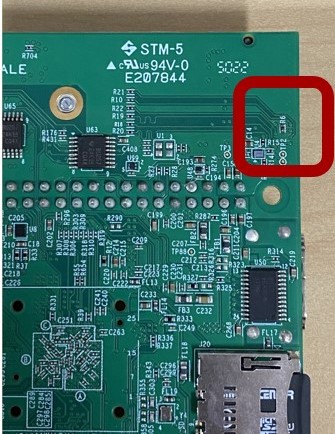
SK-AM62B R6 resistor location
After checking the existence of R6, plug in the M2-CC3351 into the M.2 Key E connector.
Warning
Do not continue until R6 is placed.
Prebuilt Images
Prebuilt images for SK-AM62B are available from the CC33xx software page.
Steps for flashing the prebuilt image are the same as in the `Beaglebone Black flashing steps`_ except
selecting the tisdk-default-image-am62xx-evm.wic.xz image file.
The benefit of using the prebuilt image is that users can get started evaluating the M.2-CC33X1 on SK-AM62B-P1 immediately, without the need for patch and compiling the linux kernel. Users can now move forward to the Software Examples.
Evaluation Software
The following steps describe how to prepare a micro SD card with the CC33XX driver.
Flash the microSD card with the prebuilt AM62x WIC image from TI: https://dr-download.ti.com/software-development/software-development-kit-sdk/MD-PvdSyIiioq/09.01.00.08/tisdk-default-image-am62xx-evm.wic.xz
On a Linux-based host PC, install the AM62 Processor SDK: https://dr-download.ti.com/software-development/software-development-kit-sdk/MD-PvdSyIiioq/09.01.00.08/ti-processor-sdk-linux-am62xx-evm-09.01.00.08-Linux-x86-Install.bin
Navigate to the ti linux kernel source directory.
$ cd ~/ti-processor-sdk-linux-am62xx-evm-09.01.00.08/board-support/ti-linux-kernel-6.1.46-.../Patch the TI linux kernel with the CC33XX patches:
$ patch -p0 < <path_to_cc33xx_folder>/patches/cc33xx_kernel.patch
$ patch -p0 < <path_to_cc33xx_folder>/patches/cc33xx_am625-sk_dts.patch
$ patch -p0 < <path_to_cc33xx_folder>/patches/cc33xx_ti_arm64_config.patch
Add the SDK’s toolchain to the PATH environment variable and clean the kernel sources:
$ export PATH=<AM62 Processor sdk path>/linux-devkit/sysroots/x86_64-arago-linux/usr/bin/aarch64-oe-linux:$PATH
$ make ARCH=arm64 CROSS_COMPILE=aarch64-oe-linux- distclean
Build the kernel, modules, and devicetree:
$ make ARCH=arm64 CROSS_COMPILE=aarch64-oe-linux- defconfig ti_arm64_prune.config
$ make ARCH=arm64 CROSS_COMPILE=aarch64-oe-linux- Image modules dtbs -j8
Install the kernel, modules, and DTBs:
$ sudo cp arch/arm64/boot/Image /media/<user>/root/boot/
$ sudo make ARCH=arm64 modules_install INSTALL_MOD_PATH=/media/<user>/root
$ sudo cp arch/arm64/boot/dts/ti/k3-am625-sk.dtb /media/<user>/root/boot/dtb/ti/
Install the CC33XX firmware and example scripts by copying the contents under “cc33xx_rootfs” into the SD card’s root directory.
$ cd <path_to_cc33xx_folder>/cc33xx_rootfs
$ sudo cp -r lib/ /media/<user>/root/
$ sudo cp -r usr/share/cc33xx/ /media/<user>/root/usr/share/
$ sync
Eject the SD card from the host PC and plug it into the SK-AM62B-P1. Apply the USB-C power supply and open a serial terminal with baudrate 115200. The CC33XX driver and Wi-Fi should now be available and the
wlan0interface should be shown in the output ofifconfig. For example scripts, refer to Software Examples.$ ifconfig wlan0 wlan0: flags=4099<UP,BROADCAST,MULTICAST> mtu 1500 ether a4:34:f1:b1:62:92 txqueuelen 1000 (Ethernet) RX packets 0 bytes 0 (0.0 B) RX errors 0 dropped 0 overruns 0 frame 0 TX packets 0 bytes 0 (0.0 B) TX errors 0 dropped 0 overruns 0 carrier 0 collisions 0
Support for other TI EVMs
This release also provides support for other TI EVMs that make use of the M.2 connector.
M.2-CC33X1 is enabled by following the same steps as above with the addition of applying
the following patches and installing the corresponding DTB. Any platform’s SDK
can be used for the EVM, but the SDK version must be 09.01.00.08.
| Board Name | Patch | DTB to copy to SD card |
|---|---|---|
| SK-AM62B-P1 | cc33xx_am625-sk_dts.patch | k3-am625-sk.dtb |
| SK-AM62A-LP | cc33xx_am62a7-sk_dts.patch | k3-am62a7-sk.dtb |
| SK-AM62P-LP | cc33xx_am62p5-sk_dts.patch | k3-am62p5-sk.dtb |